| |
| |
 |
|
|
|
| |
| |
|
|
| |
|
|
|
| |
| |
|
|
| |
|
|
FirePasswordViewer is the GUI version of popular
FirePassword tool to recover login
passwords stored by Firefox. Like other browsers, Firefox also
stores the login details such as username, password for every
website visited by the user at the user consent. All these secret
details are stored in Firefox sign-on database securely in an
encrypted format. FirePasswordViewer can instantly decrypt and
recover these secrets even if they are protected with master
password. |
|
|
Also FirePasswordViewer can be used to recover sign-on passwords
from different profile (for other users on the same system) as well
as from the different operating system (such as Linux, Mac etc).
This greatly helps forensic investigators who can copy the Firefox
profile data from the target system to different machine and recover
the passwords offline without affecting the target environment.
FirePasswordViewer is a standalone portable tool and works on wider
range of platforms starting from Windows 2000 to latest operating
system, Windows 7. |
| |
| |
|
| Here are the highlights of top features of FirePasswordViewer which
makes it stand apart from other similar tools including commercial ones. |
- Instantly decrypt and recover stored encrypted passwords from 'Firefox
Sign-on Secret Store' for all versions of Firefox.
- Supports recovery of passwords from local system as well
as remote system. User can specify Firefox profile location from the remote system to recover
the passwords.
- It can recover passwords from Firefox secret store even when it is
protected with master password. In such case user have to enter the correct master
password to successfully decrypt the sign-on passwords.
- Automatically discovers Firefox profile location based on installed
version of Firefox.
- Passwords are not shown by default for security reasons as it is
sensitive data. However user can toggle this behavior using 'Show
Password' button.
- On successful recovery operation, username, password along with a
corresponding login website is displayed.
- Sort feature to arrange the displayed password list by username,
password or website which makes it easy to search through 100's of
entries.
- User can save the recovered Firefox password list to HTML file for
transferring to other system or for future use.
- Easy and faster to use with its enhanced user friendly
interface.
- Does not require any installation as it is standalone portable tool
and can be run directly on any system.
|
| |
|
|
Firefox has a built-in password manager tool
which stores username and passwords for all the visited websites. These
credentials are stored in the encrypted form in the Firefox
profile's database files such as key3.db and signons.txt.
The key3.db file
contains master password related information such as encrypted password check string, salt,
algorithm and version information etc.
Signons.txt file contains the actual sign-on information
-
Reject Host list : List of websites for which user
don't want Firefox to remember the credentials.
-
Normal Host List : Each host URL is followed by username and
password.
|
|
| |
|
Firefox till version 3.5 stores the sign-on secrets in signons.txt
file located in the Firefox profile directory. With version 3.5 onwards
Firefox started storing the sign-on secrets in Sqlite database
file named 'signons.sqlite'. The structure of sign-on information
stored in the signons.txt file (signons2.txt for version 2
and signons3.txt for version 3) and signons.sqlite for version
3.5 onwards is described below...
|
| |
-
First comes the sign-on file header which is
always "#2c"
-
Next comes the reject host list in clear text,
one per line and terminated with full stop.
-
After that normal host list is stored in the
following format
-
Host URL
- Name (username or *password)
- Value (encrypted)
- .(full stop)
|
-
First comes the sign-on file header which is
always "#2d"
-
Next comes the reject host list in clear text,
one per line and ends with full stop.
-
After that normal host list is stored in the
following format
-
Host URL
- Name (username or *password)
- Value (encrypted)
- Subdomain URL
- .(full stop)
|
-
First comes the sign-on file header which is
always "#2e"
-
Next comes the excluded host list in clear text,
one per line and ends with full stop.
- After that saved host list is stored in the
following format
-
Host URL
- Name (username or *password)
- Value (encrypted)
- Subdomain URL
- --- (Dashed line denoting the end of host entry)
- .(full stop)
|
|
The new signons.sqlite database file has two tables moz_disabledHosts and moz_logins. The moz_disabledHosts table contains
list of excluded websites which are exempted from storing passwords by
user. The moz_logins table contains all the saved website passwords. Here is
more detailed description of each tables...
-
table - moz_disabledHosts
- id - index of each entry
- hostname - blacklisted website URL
-
table - moz_logins
- id - index of each entry
- hostname - base website URL
- httpRealm -
- formSubmitURL - Actual website URL for which secrets are saved.
- usernameField - name of username element of form field
- passwordField - name of password element of form field
- encryptedUsername - encrypted username
- encryptedPassword - encrypted password
- guid - unique GUID for each entry
- encType - value 1 indicates encrypted
|
|
|
Here each Host entry can have multiple
username/password pairs. Starting from Firefox version 2.0, sub domain
URL is also included along with username/password entry. If it is the password
field then it begins with '*'. This is the key in distinguishing
between username and password entry.
Now once the username and password values are extracted, next task is to decrypt them. Information
required to decrypt these values is stored in key3.db file. If the
master password is set, then you must provide the master password to
proceed with decryption. If you have forgotten the master password, then
you can use
Firemaster
tool to recover the master password. If the master password is set and if you have not
provided it, then FirePasswordViewer will prompt you to enter the master
password.
|
| |
| |
|
FirePasswordViewer is the standalone
application and it does not require any installation. You can just run
it by double clicking on the executable file.
Here are the brief usage details.
|
- On running, FirePasswordViewer automatically
populates the Firefox profile location if it is already installed.
Otherwise you can enter the profile location manually.
- If you have set the master password for your Firefox, then you need to
specify the same in the master password box.
- Once the profile location is specified, you can click on 'Start
Recovery' button and FirePasswordViewer will instantly recover all
passwords from Firefox sign-on store.
- By default passwords are not shown for security reasons as it is
sensitive data. However you can click on 'Show Password' button to view
these passwords.
- Finally you can save all recovered password list to HTML file by
clicking on 'Save as HTML' button.
|
| You can also use FirePasswordViewer to recover
passwords from different system either Windows or Linux. In that case you can copy Firefox
profile data from remote system to local machine and then specify that
path in the profile location field for recovering the passwords. |
| |
| |
|
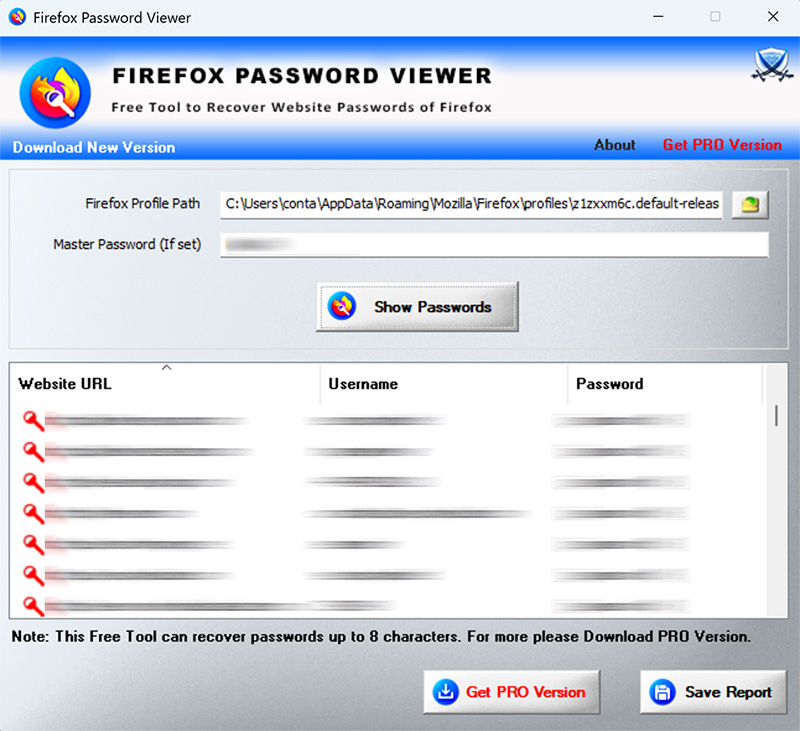
| Here are the screenshots which gives glance of
FirePasswordViewer in action. |
| |
| Screenshot 1: FirePasswordViewer showing the recovered
passwords from Firefox sign-on password store. Note that passwords are hidden by
default for security reason. |
| |
 |
|
|
| Screenshot 2: Showing the hidden passwords recovered by
FirePasswordViewer on clicking 'Show Password' button. |
| |
 |
|
|
| Screenshot 3: Recovered Firefox password list stored in HTML
format by FirePasswordViewer |
| |
 |
| |
| |
|
FirePasswordViewer is successfully tested
with Firefox version 1.0 to latest version 3.6.3 and
should work with any Firefox greater than version 1.0
If you encounter any problem with FirePasswordViewer, then please drop a
mail to me mentioning your Firefox version and any other details which will
help in fixing the problem.
|
| |
| |
|
|
Thanks to the Mozilla-Firefox crew for making such an excellent and
beautiful browser.
|
| |
| |
|
| Now FirePasswordViewer loads the Firefox binaries automatically on
the fly and those binaries will not be shipped any more. Also
FirePasswordViewer shows GREEN on virustotal analyais, earlier there was
false reporting it as trozan. |
| |
| New look & feel with sorted list control to display the recovered
passwords, show/hide password button to show/hide the passwords. |
| |
| This version comes with support for Windows 7. Also buttons now looks better with icons and new win7 banner. |
| |
| Support for recovering the passwords from Sqlite signon database
file used by latest Firefox version 3.5. |
| |
| First public release of FirePasswordViewer which is the GUI version
of popular FirePassword tool. |
| |

|
| |
|
|
|
|
| |
| |
|
|
|
| |
| |
| |
| |
| |
| |
| |
| |