SecurityXploded.com
Powered by XenArmor
Mailing List Join us on Google+ Twitter facebook RSS Feeds
BrowserHistorySpy: All-in-one Tool to View Web History of Firefox/Chrome/IE/Chrome SXS/CoolNovo/SeaMonkey Browsers
 
 
BrowserHistorySpy
See Also


Contents
 
 
About

Browser History Spy is the all-in-one software to instantly recover or view the browsing history from popular web browsers.

 
It helps in recovering or viewing web history of following browsers.
  • Mozilla Firefox
  • Internet Explorer
  • Google Chrome
  • Google Chrome Canary/SXS
  • CoolNovo
  • SeaMonkey Browser

It automatically detects the right history database file based on the browser and current user configuration. You can also manually specify the different history file or Drag & Drop a file. This is useful when you have to recover the history from another system.


You can export the recovered history list to HTML or XML file for future use.


It works on most of the Windows platforms starting from Windows XP to latest operating system, Windows 8.


Features & Benefits
  • Easy to use tool with attractive GUI Interface.
  • Automatically detect the history database file for particular browser and user.
  • Option to manually specify the history file for Chrome/Firefox browsers.
  • Add/Remove the history URLs from Internet Explorer.
  • 'Sort Feature' to sort the history list based on URL, Title, Date etc.
  • Save the recovered history list to HTML/XML file.
  • Fully Portable - You can directly run it from any Windows system.
  • Optional Installer for local installation/uninstallation on your system.
 
 
Installation & Uninstallation
BrowserHistorySpy comes with Installer so that you can install it locally on your system for regular usage. It has intuitive setup wizard (as shown in the screenshot below) which guides you through series of steps in completion of installation.
 
At any point of time, you can uninstall the product using the Uninstaller located at following location (by default)
 
[Windows 32 bit]
C:\Program Files\SecurityXploded\BrowserHistorySpy

[Windows 64 bit]
C:\Program Files (x86)\SecurityXploded\BrowserHistorySpy


How to Use?
'Browser History Spy' is easy to use with its simple GUI interface. 

Here are the brief usage details
  • Launch BrowserHistorySpy on your system
  • Now you can move to Firefox/Chrome/Internet Explorer tab to view the web history from respetive browser.
  • By default it will automatically display current history file. If not, you can manually select the right history file for your browser.
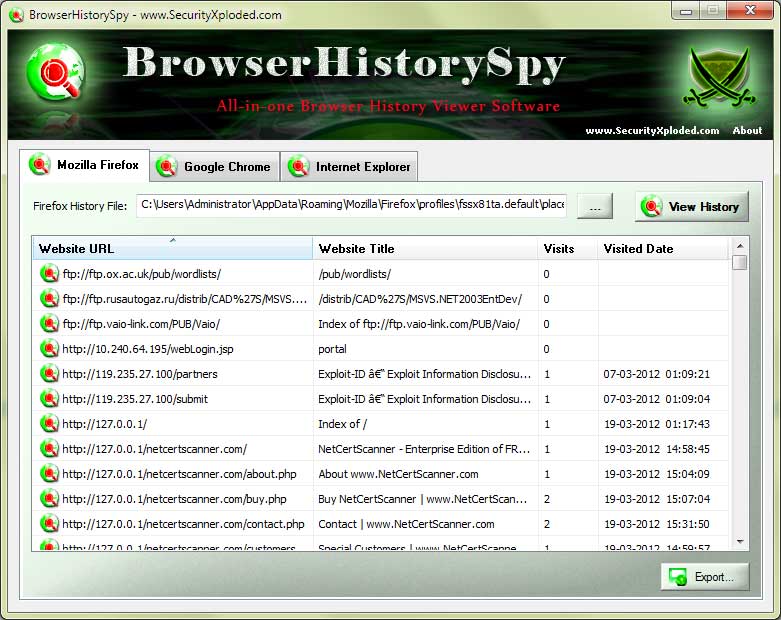
  • Now click on 'View History' and all the visited URLs from your browser will be displayed as shown in the screenshot below.
  • To make it easier, you can click on List header to sort it by URL/Title/Visits/Date.
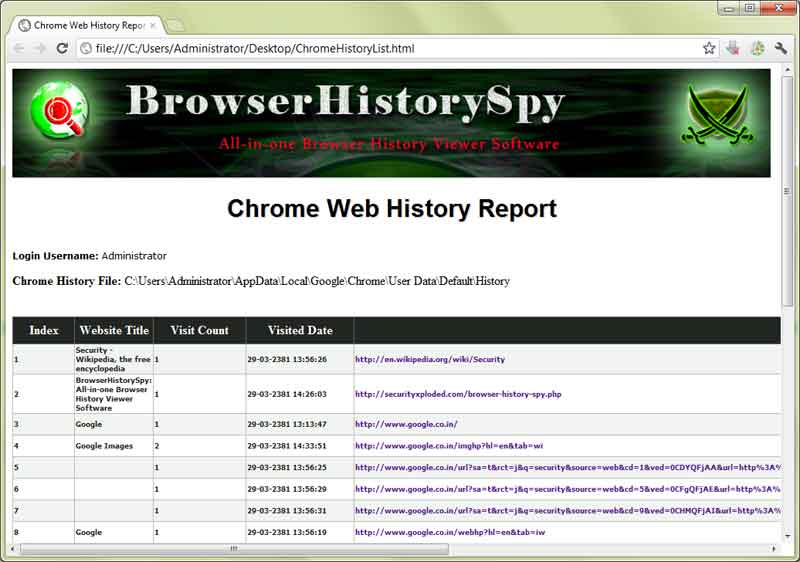
  • Finally you can save the history list to HTML/XML file by clicking on 'Export' button and then select the type of file from the drop down box of 'Save File Dialog'

Note: To view web history of Chrome SXS/CoolNovo Browser use Google Chrome Tab and for SeaMonkey browser use Firefox tab.


Screenshots
Screenshot 1:BrowserHistorySpy is showing the recovered history list from Firefox browser.
 
BrowserHistorySpy showing recovered passwords
 
 
Screenshot 2:  History List exported to HTML file
 
BrowserHistorySpy


Release History
Version 2.0 :  20th Mar 2013
Now you can view Web History of SeaMonkey & CoolNovo browsers also. Support for Drag & Drop of history file.
 
Version 1.5 :  12th Dec 2012
Improved user interface with cool new banner. Tested successfully with latest version of IE 10 (Win7), Firefox (v17.0.1) & Chrome (v23.0),
 
Version 1.0 :  29th Mar 2012
First public release of BrowserHistorySpy


Disclaimer
BrowserHistorySpy is the clean and simple tool to help you recover and view web browsing history from your local browsers.

Like any tool its use either good or bad, depends upon the user who uses it. However Author or SecurityXploded is not responsible for any damage caused due to misuse of this tool.

Read complete License & Disclaimer terms here.


Download
FREE Download Browser History Spy v2.0

License : Freeware
Platform: Windows XP, 2003, Vista, Windows 7, Windows 8

Download


See Also