RemoteDLL is the tool which makes it easy to inject the DLL or free the
DLL from remote process. This tool is based on popular DLL Injection
technique which has already been used in many top programs such as pwdump. Many spyware programs uses this technique to hide their
presence. Many of these comes as DLL and injects themselves to
legitimate windows process and operates from that process so that normal
user will not suspect its presence. Using RemoteDLL you can easily
remove such DLL from the process and then delete it from the system
completely.
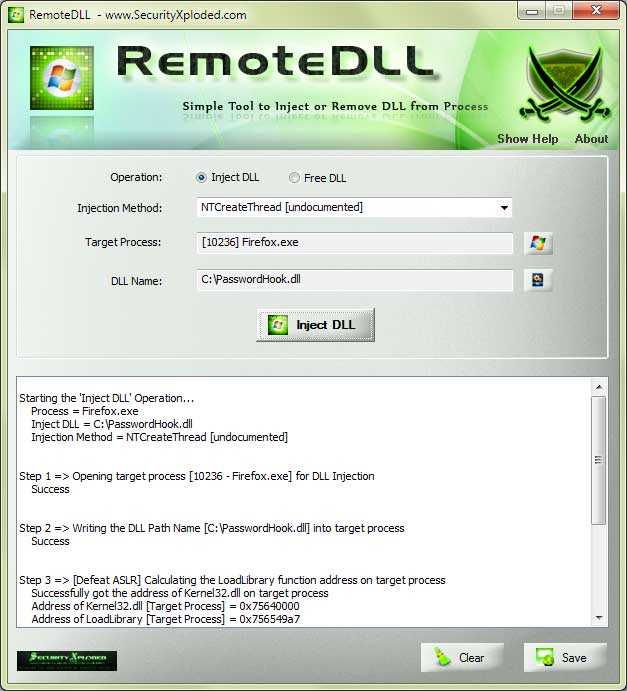
RemoteDLL in Action
How RemoteDLL works?
This tool is entirely based upon the DLL Injection concept. In short DLL
Injection uses CreateRemoteThread API to invoke LoadLibrary or FreeLibrary on
remote process. Here is a
very good article which
explains this technique in detail. I suggest you to read that article to better
understand working of RemoteDLL.
Injecting the DLL into Remote Process
Below are the steps for injecting the DLL into another process using
RemoteDLL.
Select the "Load DLL" option.
Now select the process to which you want to inject the DLL.
Next specify the the DLL and press the "Load DLL" button
The specified DLL will be injected into the target process and
the result of entire operation will be displayed in status window.
Removing the DLL from Remote Process
Follow the below mentioned steps to remove DLL from any process using
RemoteDLL. Note that removing DLL from process may crash it or
destabilize the entire system. So make sure you know what you are doing
before using it.
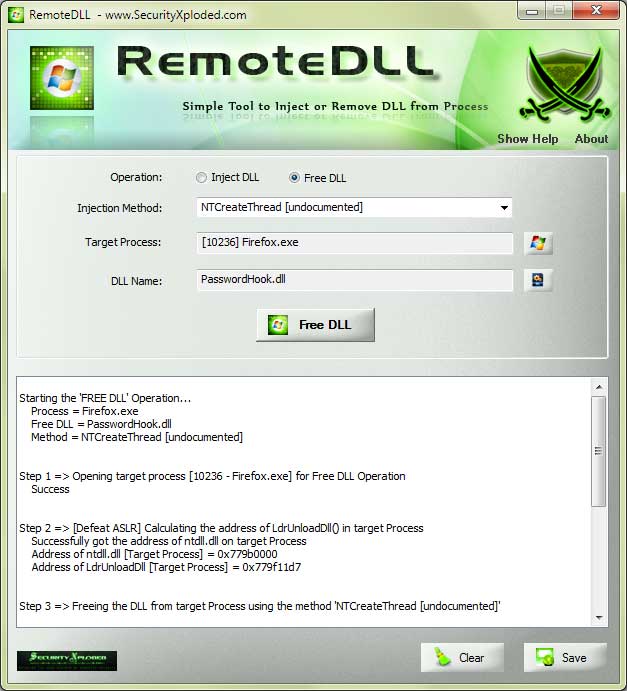
Select the "Free DLL" option from the main screen.
Next select the process from which you want to remove the DLL.
Now select the DLL to be removed from the process using DLL
selection dialog. It displays following information about each DLL
DLL Name
Base Address
Entry Point of DLL
Size of the DLL in memory
Load count or Reference Count of DLL
Static or dynamically loaded
Next press the "Free DLL" button to remove the DLL from process. Result will be displayed
step by step in the status window.
Note that only dynamically loaded DLLs can be removed from the process.
Reference count : Unique feature of RemoteDLL
Reference count or load count indicates how many times the DLL is
loaded into the process. Each time the DLL is loaded , process increases
that DLL's reference count. So when you want to remove the DLL from
the process, you have to invoke the FreeLibrary function that many times
to completely free it.
Reference count is the unique feature of RemoteDLL which is not present
in any other similar tools. This is
because there is no direct way or API function to get this information.
Reference count for the DLL is stored in the PEB (Process Environment
Block) for that process. PEB contains the linked list of DLL Module
Structure which contain complete information about that particular DLL.
One can retrieve the PEB data of remote process by using
ReadProcessMemory() API.
The composite test 642-892 is the fastest way for presently certified CCNP and CCDP to attain recertification. 642-503 develops Cisco IOS commands to alleviate Layer 2 attacks. 70-272 enables you to deal with the supporting users and helping desktop applications on a Microsoft Windows XP Operating System. Candidates for 642-164 can get ready for this test by taking the UCCXD v 1.1 Unified Contact Center Express & Unified IP/IVR Deployment diplomas. The Juniper JN0-521 test is also recognized as the Juniper Networks Certified Internet Associate.
"when the going gets r3v3rsed, the r3v3rsing gets going"