SecurityXploded.com
Mailing List Join us on Google+ Twitter facebook Youtube RSS Feeds
Digsby Password Decryptor : Digsby Password Recovery Tool- www.SecurityXploded.com


DigsbyPasswordDecryptor
Download DigsbyPasswordDecryptor
 
 
5 Star Award 5 Star Award 5 Star Award Five Star Award
 
See Also


Contents
 
 
About DigsbyPasswordDecryptor
DigsbyPasswordDecryptor is the FREE software to instantly recover all stored account passwords by Digsby. Digsby is one of the popular instant messenger of recent times with IM client, Email Notification & Social Networking all in one software. Digsby has a multi protocol IM client that lets you chat with all your friends on AIM, MSN, Yahoo, ICQ, Google Talk, and Jabber with one buddy list.

Like most of messengers, Digsby also stores the user account details including passwords in the local disk for subsequent logins so that user do not have to enter the password every time.
DigsbyPasswordDecryptor helps in recovering all such account passwords stored by Digsby. It can automatically detect the correct secret password file based on installed version of Digsby and then decrypt all the stored account passwords on the fly. 

Current version comes with 'Setup Wizard' for local Installation & Uninstallation of the software.

DigsbyPasswordDecryptor works on most of the Windows platforms starting from Windows XP to latest operating system, Windows 7.


Features of DigsbyPasswordDecryptor
Here are the highlights of top features of DigsbyPasswordDecryptor which makes it stand apart from other similar tools including commercial ones.
  •  Instantly decrypt and recover stored encrypted passwords by Digsby.

  •  Passwords are not shown by default for security reasons as it is sensitive data. However user can toggle this behavior using 'Show Password' button.

  •  On successful recovery operation, messenger account type, username and password is displayed.

  •  Sort feature to arrange the displayed password list by username and password which makes it easy to search through 100's of entries.

  •  User can save the recovered password list to HTML file for transferring to other system or for future use.

  •  Easy and faster to use with its enhanced user friendly interface.

  •  Completely Portable Tool which also comes with optional Installer for assisting you in local Installation & Uninstallation.
 
 
Internals of DigsbyPasswordDecryptor
Like most instant messengers, Digsby stores main account password in the secret password file so that user do not have to enter the password every time. This password is stored only if user has selected 'Save Password' at login time.

Latest versions of Digsby (Build 83 - r28550 as of this writing) stores main account password in the 'logininfo.yaml' file at following location,
[Windows XP]
C:\Documents and Settings\<user_name>\Local Settings\Application Data\Digsby

[Windows Vista & Windows 7]
C:\Users\<user_name>\AppData\Local\Digsby
 
For more technical details on how Digsby encrypts the password and how we can decrypt it manually, refer to following research article  Exposing the Password Secrets of Digsby


Installing DigsbyPasswordDecryptor
Though DigsbyPasswordDecryptor is a Portable tool, it comes with Installer so that you can install it locally on your system for regular usage. This installer has intuitive wizard (as shown in the screenshot below) which guides you through series of steps in completion of installation. At any point of time you can use Uninstaller to remove the software from the system.
 
DigsbyPasswordDecryptor Installer


Using DigsbyPasswordDecryptor
DigsbyPasswordDecryptor is the very simple tool to use even for home users. Here are the typical usage steps
  •  On running the application, click on 'Start Recovery' button to begin the password recovery process.

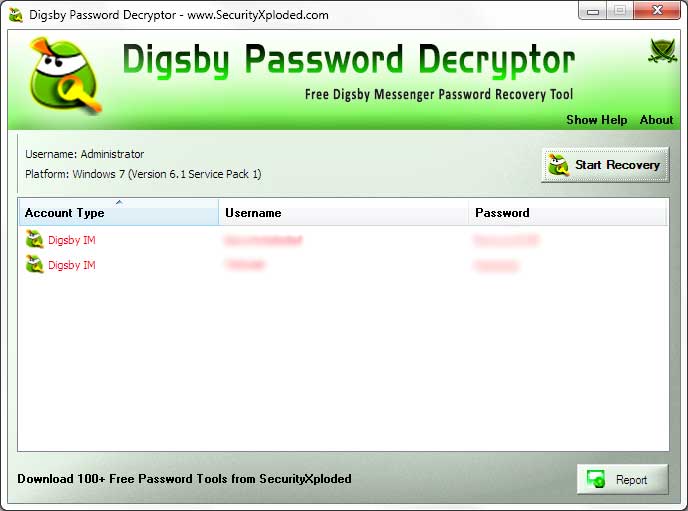
  •  It will automatically scan and recover the password and display it as shown in the screenshot below.

  •  By default passwords are hidden for sensitive reasons. You can click on 'Show/Hide password' button at the bottom to view/hide the passwords.

  •  Finally you can save the complete recovered password list to HTML file for future usage.

 
Screenshots of DigsbyPasswordDecryptor
Here are the screenshots of DigsbyPasswordDecryptor
 
Screenshot 1:DigsbyPasswordDecryptor is showing the recovered password list for all accounts stored by Digsby.
 
DigsbyPasswordDecryptor showing recovered passwords
 
 
Screenshot 2:  Exported list of of recovered Digsby account passwords by DigsbyPasswordDecryptor in HTML format.
 
Exported Digsby Accounts to HTML
 
 
Release History
Version 1.6 :  3rd Apr 2011
Added links for PasswordForensics.com in about section and few minor bug fixes.
 
Version 1.5 :  17th Nov 2010
Support for Setup Wizard for local Installation & Uninstallation of the software.
 
Version 1.0 :  21th Oct 2010
First public release of DigsbyPasswordDecryptor
 
 
Disclaimer
DigsbyPasswordDecryptor is designed for good purpose to help users to recover the lost Digsby account passwords. Like any tool its use either good or bad, depends upon the user who uses it. However author is not responsible for any damage caused due to misuse of this tool.

Read complete License & Disclaimer terms here.
 
 
Download DigsbyPasswordDecryptor
 
  FREE Download DigsbyPasswordDecryptor 1.6

License  : Freeware
Platform : Windows XP, 2003, Vista, Win7

Win 7 Compatible
 
 
See Also