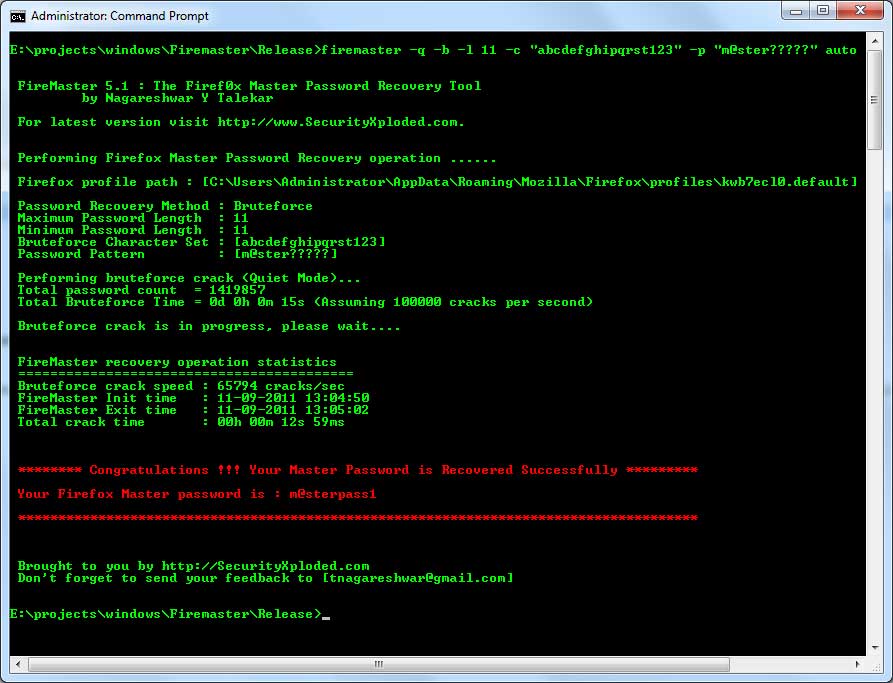
|
| FireMaster: Firefox Master Password Recovery Tool
Version: 9.0
|
|
| Download FireMasterCracker - GUI Version of FireMaster |
|
 |
|
|
|
|
|
|
|
|
|
| |
|

|
FireMaster is the first ever tool developed to recover your forgotten Master Password of Firefox (all versions) using simple to advanced password recovery techniques. |
|
|
|
Not only Firefox, it can also recover master password for all Mozilla based apps like Thunderbird, Instantbird, PostBox, FossaMail, Comodo Dragon, SeaMonkey, WaterFox etc
Also new 2024 version (v8.0) now supports master password recovery from latest key4.db file for all Mozilla based apps including Firefox
Master password is used by
Firefox to protect the stored loign/password information for all visited websites. If the master password is forgotten, then there
is no way to recover the master password and user will lose all the passwords stored in it.
Now you can use FireMaster to recover the forgotten master password and get back all the stored Login/Passwords.
FireMaster
supports following Firefox Master Password Recovery methods,
- Dictionary Method
- Hybrid-Dictionary Method
- Brute-force Method
- Pattern based Brute-force Method
Pattern based technique reduces recovery time significantly especially when you remember part of the password.
FireMaster is successfully tested with all versions of Firefox starting from 1.0 to latest version. It works on wide range of
platforms starting from Windows Vista to Windows 11
|
| |
|
Firefox comes with
built-in password manager tool which remembers username and passwords
for all the websites you visit. This login/password information is stored in the encrypted
form in Firefox database files residing in user's profile directory.
However any body can just launch the password manager from the Firefox
browser and view the credentials. Also one can just copy these database
files to different machine and view it offline using the tools such as FirePassword.
|
| Hence to protect from
such threats, Firefox uses master password to provide enhanced security. By
default Firefox does not set the master password. However once you have set the
master password, you need to provide it every time to view login credentials. So if you lose
the master password then that means you have lost all the stored passwords as well. |
So far there was no way to recover these credentials once you have lost the master password. Now the FireMaster can
help you to recover the master password and get back all the sign-on
information. |
| |
| |
|
Once you have lost master password, there is no way to
recover it as it is not stored at all.
Whenever user enters the master
password, Firefox uses it to decrypt the encrypted data associated with
the known string. If the decrypted data matches this known string then
the entered password is correct. FireMaster uses
the similar technique to check for the master
password, but in more optimized way.
The entire operation
goes like this.
|
- FireMaster
generates passwords on the fly through various methods.
- Then it computes
the hash of the password using known algorithm.
- Next this password
hash is used to decrypt the encrypted data for known plain
text (i.e. "password-check").
- Now if the
decrypted string matches with the known plain text (i.e.
"password-check") then the generated password is the master
password.
|
|
| Firefox stores the
details about encrypted string, salt, algorithm and version information
in key database file key3.db or key4.db in the user's profile directory. You can
just copy this key3.db/key4.db file to different directory and specify the
corresponding path to FireMaster. You can also copy this key3.db/key4.db to any
other high end machine for faster recovery operation. |
|
| FireMaster supports
following password recovery methods
|
|
In this mode,
FireMaster uses dictionary file having each word on separate line to
perform the operation. You can find lot of online dictionary with
different sizes and pass it on to Firemaster. This method is more
quicker and can find out common passwords. |
|
This is advanced
dictionary method, in which each word in the dictionary file is prefixed
or suffixed with generated word from known character list. This can find
out password like pass123, 12test, test34 etc. From the specified
character list (such as 123), all combinations of strings are generated
and appended or prefixed to the dictionary word based on user settings. |
|
In this method, all
possible combinations of words from given character list is generated
and then subjected to cracking process. This may take long time
depending upon the number of characters and position count specified. |
|
| Pattern based cracking method significantly reduces the password
recovery time especially when password is complex. This method can
be used when you know the exact password length and remember few
characters. |
| |
|
| |
|
| First you need to copy
the key3.db/key4.db file to temporary directory. Later you have to specify this directory path for FireMaster as a last argument.
Here is the general usage information
|
|
|
Firemaster [-q]
[-d -f <dict_file>]
[-h -f <dict_file> -n <length> -g "charlist" [ -s | -p ] ]
[-b -m <length> -l <length> -c "charlist" -p "pattern" ]
<Firefox_Profile_Path>
|
|
| -d |
Perform dictionary crack |
| -f |
Dictionary file with words on each line |
|
| -h |
Perform hybrid crack operation using dictionary
passwords.
Hybrid crack can find passwords like pass123, 123pass etc |
| -f |
Dictionary file with words on each line |
| -g |
Group of characters used for generating the strings |
| -n |
Maximum length of strings to be generated using above
character list
These strings are added to the dictionary word to form the
password |
| -s |
Suffix the generated characters to the dictionary
word(pass123) |
| -p |
Prefix the generated characters to the dictionary
word(123pass) |
|
| -b |
Perform brute force crack |
| -c |
Character list used for brute force cracking process |
| -m |
[Optional] Specify the minimum length of password |
| -l |
Specify the maximum length of password |
| -p |
[Optional] Specify the pattern for the password |
|
|
|
| Examples of FireMaster |
|
|
| FireMaster.exe -d -f c:\passfile.txt auto |
|
| FireMaster.exe -h -f c:\passfile.txt -n 3 -g "123" -s auto |
|
| FireMaster.exe -q -b -m 3 -l 10 -c "abcdetps123" "c:\my
test\firefox" |
|
| FireMaster.exe -q -b -m 3 -c "abyz126" -l 10 -p "pa??f??123" auto |
|
|
|
Here Firefox_Profile_Path
refers to the directory where key3.db/key4.db file is present. This points to
the Firefox profile directory (Ex: C:\Documents and
Settings\<user>\Application Data\Mozilla\Firefox\Profiles\<prof
name>) on your machine. However you can also copy key3.db/ey4.db file from
any other machine such as Linux system to your
local windows machine and specify that path during recovering operation. |
|
Quiet mode ( -q option
) will disable printing each password while recovery is in progress.
This makes it much faster especially for brute force operation. However during brute force operation if
the password count exceeds 50000 passwords then it automatically enters
the
quiet mode. |
|
Hybrid method tries normal
dictionary password as well as password created by
appending/prefixing the generated strings to the dictionary word.
For example if the dictionary word is "test" and you have specified
character set as '123' (-c 123 -s) then the new passwords will be
test1, test12, test123, test32 etc. |
|
| By default FireMaster includes smaller password list file
"passlist.txt". You can find larger password dictionary file
here |
|
Character list (-g
for hybrid and -c
for brute force) specifies the characters to be used for generating
passwords. If you don't specify then the default character list is used.
For brute force -m indicates the minimum length of password to be
generated.
This can reduce the generated passwords and hence the
time considerably when large number of character set is specified. Similarly
-l (small 'L') specifies the maximum length of password to be
generated. For example, if you specify -m 6 and -l 8 then only
passwords which are of length at least 6 and above but below 8 will
be generated.
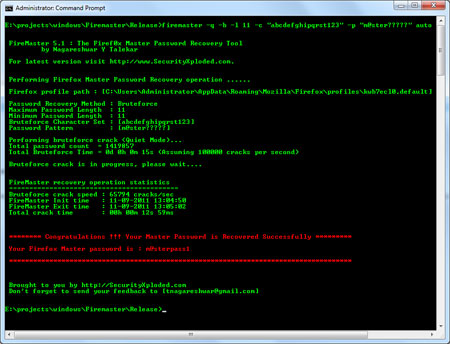
If you know that password
is of certain length and also remember few characters then you can
specify that pattern for brute force cracking. For example, assume
that you have set the master password of length 12 and it begins
with 'fire' and ends with '123' then command will look like below
|
|
| FireMaster.exe -b -c "abyz" -l 12 -p
"fire?????123" c:\testpath |
|
| This will reduce the time to seconds which otherwise would have
taken days or hours to crack that password. You can even crack the
impossible looking passwords using the right pattern. |
| |
| |
|
 |
| |
| |
|
FireMaster is successfully tested with latest
Firefox version and it can recover master password successfully from any
Firefox, starting with version 1.0 or more.
If the FireMaster failed to work with your Firefox version then please send us the
key3.db/key4.db (and cert8.db for older version) files which are present in your Firefox profile
directory. Note that sign-on
credentials are stored in the signons.txt file and key3.db/key4.db just contains
the master password related information. So even if some one knows your
master password it will be useless unless he/she has access to
password database file (signons.txt/logins.json). |
| |
|
| FireMaster is designed with good
intention to recover your lost Master Password so that every one keep
enjoying their experience with Firefox. Like any other tool its use
either good or bad, depends upon the user who uses it. However neither author nor SecurityXploded is
in anyway responsible for damages or impact caused due to misuse of FireMaster.
Read our complete 'License & Disclaimer'
policy here.
|
| |
|
Thanks to the
Mozilla-Firefox crew for making such an excellent, beautiful, free
browser.Thanks to everyone who shared their experience with FireMaster through their
valuable feedbacks and suggestions. |
| |
|
| Mega 2026 release supporting master password recovery from Firefox v140+ with new NSS crypto library. |
| |
| New 2024 version supporting master password recovery from new key4.db file of all Mozilla apps including Firefox, Thunderbird, Postbox, FossaMail, WaterFox, Seamonkey etc |
| |
| Important release with the major fix to brute force password recovery operation. |
| |
| Major 2016 edition with support for latest Firefox version on Windows 10. |
| |
| Integrated Uninstaller into Windows Add/Remove Programs, now you can uninstall it in a standard way. Also added feature for dynamically downloading latest version |
| |
| Fixed the problem with checking for empty Master Password during initialization. |
| |
| Fixed critical bug in Dictionary & Hybrid Crack with first character missing. Thanks to josebautista for reporting the error. |
| |
| Fixed minor bugs in UI and messages, Works well with latest version of Firefox v11. |
| |
| Tested successfully with latest version of Firefox v6.0.2. Fixed
the issue with silent mode operation.
|
| |
| Automatically discover default Firefox profile path,
Support for showing up larger numbers & total time,
Silent mode with no verbose messages and prompts - good for scripting
& few bug fixes and better of display of intermediate results.
|
| |
| Installer for local Installation & Uninstallation of the
software. Few usability interface related changes. |
| |
| Support for Windows 7. Error messages are now shown clearly in RED. Few bug fixes and security changes.
|
| |
| Resolved the compatibility problem with latest Firefox version
3.5. Now FireMaster dynamically detects the Firefox version and
recovers the master password accordingly. |
| |
| Fixed the bug in recovering the master password for Iceweasel which
is browser derived from Firefox. |
| |
| Support for Firefox version 3.0, now you can recover the master
password of latest version of Firefox. The differences in reading the
Firefox key database file is resolved. |
| |
| Kudos to the Firefox crew for yet another beautiful version of
Firefox...! |
| |
| Pattern based brute force password recovery method is implemented
which reduces the time considerably when certain part of the password is already known. Also minimum length of password can be specified which improves the
recovery time greatly. |
| Usage is simplified by forcing one crack method at a time and
providing better meaningful options. Fixed the bug
in displaying statistics and now it displays the remaining time
accurately based on the current speed which is computed dynamically. |
| |
| Thanks for your suggestions and feedbacks... |
| |
| FireMaster source
code is released under GPL v2. |
| |
| Tested successfully
with latest version 1.5.0.4 of Firefox. |
| Statistics display
during the operation is improved. |
| |
| First public release
of FireMaster SOURCE code. |
| Now it works at
amazing speed of 50k passwords per second on normal m/c. |
| Firefox library
dependency is removed completely. |
| For brute force, speed
and time is displayed during operation. |
| Lots of optimizations
and few bug fixes. |
| Thanks to 'T Barton'
for reporting the bug with 1.5 version. |
| |
| Bug in parsing key3.db
fixed. |
| Displaying results
during recovery operation. |
| Speed is doubled
compared to the original version. |
| |
| First public release
of FireMaster. |
| |
|
| |
|
|
|
|
| Presenting FireMasterCracker - GUI Version of FireMaster |
|
|
|
|
| |
| |
|
|
|
|