|
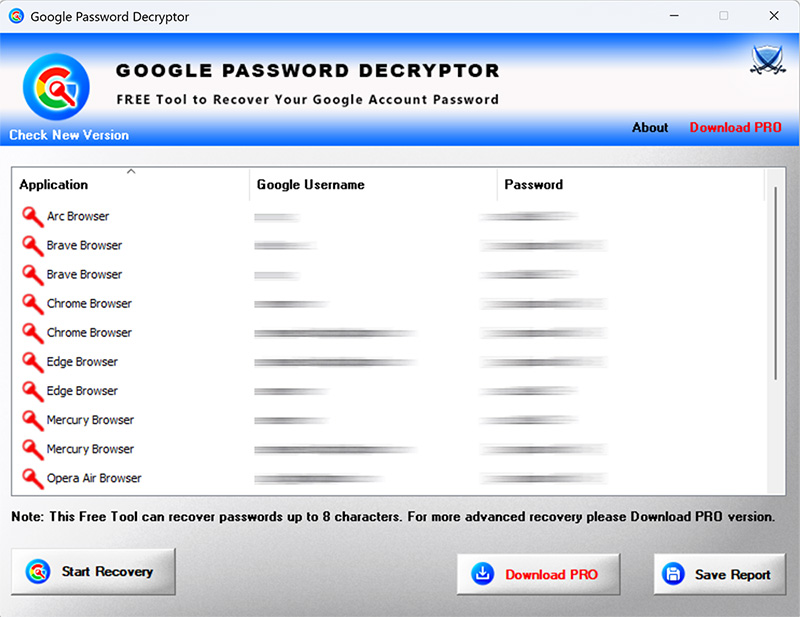
New 2026 release supporting Windows 11 and Google password recovery from 50+ apps. Support v20 encryption based password recovery from all new Chromium based browsers. Support Firefox v140+ with new NSS crypto library. Enhanced GUI interface & improved HTML report.
|
| |
| Mega 2020 release supporting Google password recovery from 30+ browsers including Microsoft Edge, Coc Coc, Comodo, Epic, Chedot, CCleaner browser etc. Also supports new master key based password recovery from latest Chrome browser (v80.0) |
| |
| Improved Google password recovery from all profiles of Firefox & Chrome. |
| |
| Major revision with support for recovering Google passwords from IE browser without history. Also fixed false antivirus alerts. |
| |
| Support for recovery of Google passwords from ALL profiles of Chrome & Firefox browser. |
| |
| Major 2019 release with support for Google password recovery from new Brave browser. |
| |
| Minor update to fix bugs in google password recovery |
| |
| Mega 2018 release to support Master Password and Google Password Recovery from Firefox's new crypto database |
| |
| Major edition supporting Google password recovery from latest version of Firefox (both 32 - bit & 64 - bit) |
| |
| Added feature to recover Google/Gmail passwords from new Microsoft Edge, Opera browsers. |
| |
| Major 2016 edition featuring brand new Installer with cool screens. Also added support for Google password recovery from new browsers like UC, Torch etc. |
| |
| Mega release with support for recovering Google password in new Windows 10 version.Also featuring new renovated user friendly GUI interface. |
| |
| New feature added to Installer to dynamically download latest version |
| |
| Minor updates to Installer. Also removed false positive with Antivirus solutions. |
| |
| Mega release with a support to recover Google account from new Firefox password file 'logins.json' starting with version 32. Also integrated Uninstaller into Add/Remove Programs of Windows. |
| |
| Removed false positive with various Antivirus solutions |
| |
| Support for Google password recovery from SRWare Iron web browser |
| |
| New feature to generate password recovery report in CSV (Comma-Seperated Values) File Format. |
| |
| Removed the support for command-line feature as now we have exclusive command-line tool |
| |
| Mega version supporting Google Password Recovery from Internet Explorer v10 and latest Firefox v22.0 |
| |
| Support for Google Password Recovery from Comodo Dragon browser. |
| |
| New feature to recover passwords from Chrome SXS, CoolNovo & SeaMonkey browser. Also added ability to dynamically find out plutil path for Safari browser. |
| |
| Support for Windows 8. New Google Account URLs added for Password Recovery from IE. Display operating system version, Quick download link. Fixed IE version detection bug in command-line mode. |
| |
| Enhanced user interface with new banner and icon. Improved Password Recovery reports in HTML/XML/TEXT format. |
| |
| Support for report generation in XML format in both GUI/Command-line
mode. Improved GUI interface with New Banner and Version changes. |
| |
| Added about logo, links for passwordforensics.com and minor bug
fixes. |
| |
| Support for password recovery from Safari, Flock browsers. Fix for Firefox and Chrome. |
| |
| Support for password recovery from Firefox, Miranda Messenger.
Command line interface etc. |
| |
| Support for Password Recovery from Paltalk & Pidgin Messenger.
Includes Automatic Version Checker. Optional Installer for local
Installation and Uninstallation. |
| |
| Support for latest Chrome version along with minor user interface
improvements. |
| |
| Added support for recovering google account password from Opera
browser. |
| |
| New enhanced user interface, resolution of chrome issues, show/hide
password security option and support for recovering password from latest
Picasa version. |
| |
| First public release of GooglePasswordDecryptor which can recover
Google account passwords stored by prominent applications. Also features
the export functionality to save the recovered password data in HTML as
well as plain text format. |