|
| Network Share Monitor
Version: 4.0
|
|
| |
|
|
| |
| |
| |
|
|
|
| |
| |
|

|
Net Share Monitor is the free software to Monitor your Shared Files from unknown users in the network. |
|
|
|
Whenever any remote user accesses your Shared Files, NetShareMonitor alerts you by blinking the icon in the systray or making the alert sound. For each connection, it shows the IP address, user name & shared files being accessed by the remote host.
In addition to this, your can also monitor your system from hackers (Null Session Detection) and worms (\pipe\browse) which spreads through network shares.
It presents attractive & user friendly GUI interface showcasing following tabs, |
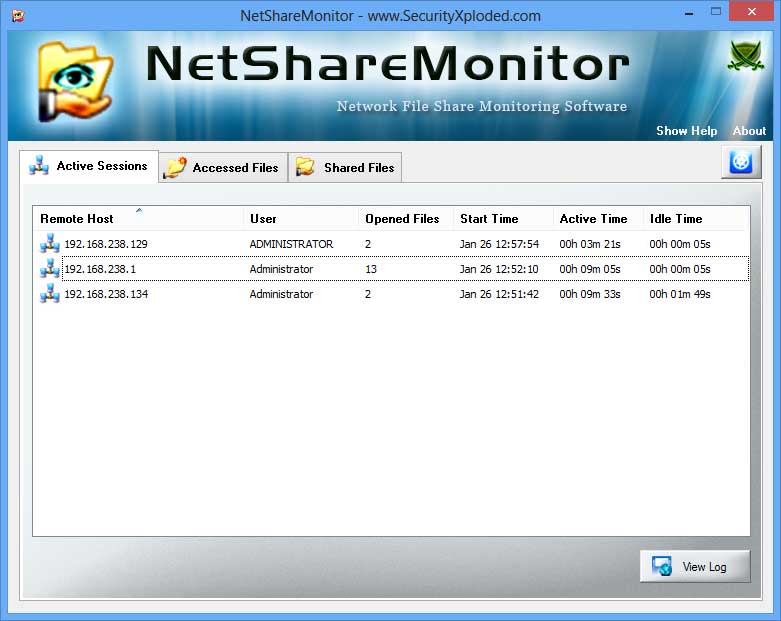
- Active Sessions Tab - shows all the remote connections with IP address, user name, time
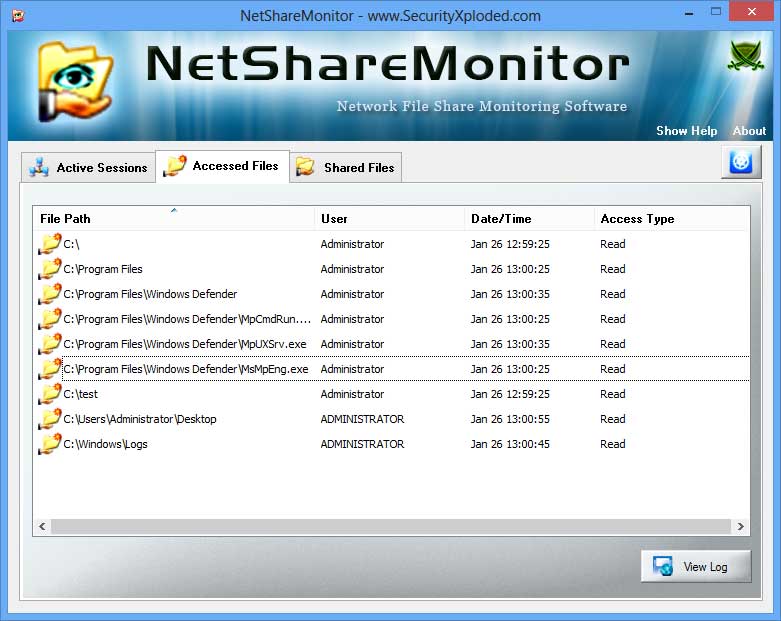
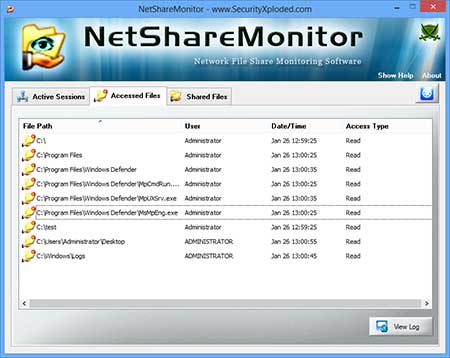
- Accessed File Tab - shows all your shared files currently being accessed by remote user
- Shared Files Tab - shows all the shared files on your system.
|
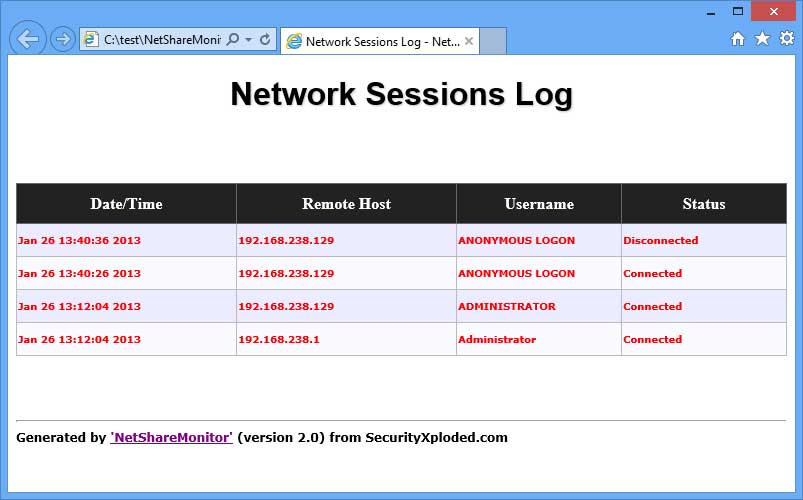
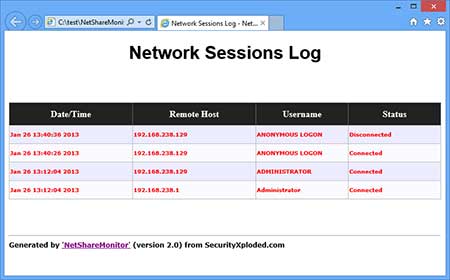
New HTML based Live Session Logging helps you to keep track of all the remote systems connected to your file shares. Each connection log records the time of the event, IP address of remote host, user name and type of event. Also 'Accessed File Logging' helps you to know all the shared files accessed by remote user during the session.
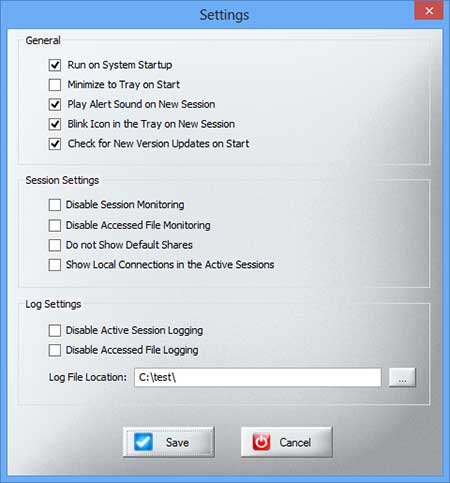
New version also presents detailed Settings that allows you to dynamically enable/disable the Session File Monitoring, Logging and Alert mechanisms as per your requirements.
It works on both 32 bit & 64 bit platforms starting from Windows XP to Windows 10. |
| |
| |
| |
|
- Easy to use tool with attractive GUI interface
- Monitor all your shared files from network users
- Smart refresh of Live connections and accessed files.
- Live display of remote sessions with IP address, User name, Active time etc
- Live HTML based Active Sessions & Accessed File logging
- Automatic Alert Notification on New Connection
- Dynamically enable/disable Session & Accessed File Monitoring
- Silent Mode Settings [no blinking icon, no sound]
- Settings to control Monitoring, Logging, Alert mechanisms
- System tray Feature - Monitor Shares Silently in the Background
- Installer for local installation & un-installation
|
| |
| |
|
| Net Share Monitor comes with
Installer to make it easier to install it locally on your system for regular usage. This
installer has intuitive wizard which
guides you through series of steps in completion of installation. |
| |
| At any point of time, you can uninstall the product using the
Uninstaller located at following location (by default) |
| |
[Windows 32 bit]
C:\Program Files\SecurityXploded\NetShareMonitor
[Windows 64 bit]
C:\Program Files
(x86)\SecurityXploded\NetShareMonitor |
| |
| |
|
|
|
|
NetShareMonitor is very easy to use with its lively GUI interface.
Here are few easy steps to get you started. |
- Launch the NetShareMonitor on your system after Installation
- You will see following three tabs (as shown in the screenshot below)
- Active Sessions - displays all live remote connections with IP address, username, open files
- Accessed Files - displays all the shared files with remote user name, file path, type of access etc
- Shared Files - displays all the shared files (including hidden shares) on your system
- You can click on 'View Log' to view all the remote connections (sessions log) & files (accessed file log) accessed since the start of NetShareMonitor. Note that every time you restart, new log file will be created.
- Settings button (top-right side) allows you to control various settings as shown in the screenshot below.
- Finally you can minimize it to System Tray to continuously monitor the shared files.
|
| |
For testing purpose, you can just launch NetShareMonitor. Then type (in the Start->Run) \\127.0.0.1\ or \\your_hostname\\c$. And you will see all shared folders on your system.
Now try to open any of the shown folder and you will see NetShareMonitor triggering alert. The main screen will show the IP address and files being accessed. |
| |
|
|
|
|
|
| Screenshot 1: Net Share Monitor Showing all the Active Sessions from remote systems |
| |
|
|
|
| Screenshot 2: Net Share Monitor showing
all the 'Accessed Files' by remote users. |
| |
|
|
|
| Screenshot 3: Settings dialog to control all options as per your tastes. |
| |
|
|
|
| Screenshot 4: Active Sessions Log of all the current connections from remote system. |
| |
 |
| |
| |
| |
|
| Mega release with the support for monitoring network share on Windows 10. Also added new Installer/Uninstaller. |
| |
| New feature added to Installer to dynamically download latest version |
| |
| Integrated Uninstaller into Windows Add/Remove Programs, now you can uninstall it in a standard way. Fixed few minor bugs. |
| |
| Support for generating 'Shared File report' in CSV (Comma-Seperated Values) File Format. Improved GUI interface with magnifying icon effects. |
| |
| Automatically detect & activate previous instance of NetShareMonitor if it is already running. Open folder on double click from Accessed Files/Shared Files List. |
| |
| New fully Renovated Edition with Smart Refresh of Remote Sessions/Files. Live HTML based Sessions & Accessed File logging. Settings to dynamically enable/disable live monitoring, logging and alert mechanisms. |
| |
| GUI modification and few bug fixes. |
| |
| First public release of NetShareMonitor. |
| |
|
| |
| |
|
|
|
| |
| |
| |
| |
|
|
|