Pcprox RFID Reader is the FREE tool for reading
RFID/HID card ID using pcProx USB readers.
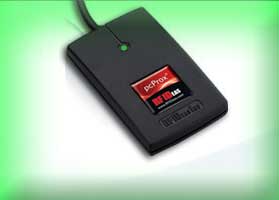
PcProx is
popular range of HID (RFID) card readers - from RFIdeas Inc -
typically used by administrators to configure and enroll new
(HID based) access cards. These access cards are
commonly used as identification and tracking mechanism for employees
in most organizations around the world.
'Pcprox RFID Reader'
makes it easy to read the ID or number embedded inside those HID based access cards. It supports all range of USB based PcProx readers from
RFIdeas Inc.
Here are common use cases of Pcprox RFID Reader
Offers great
help to administrators while configuring & enrolling new access cards (HID)
Makes it easy for troubleshooting any problems associated with
pcProx card reader or HID card.
In case of manual registration
process, user can find out their HID card ID and send it for
registration.
Just for fun, you can find out the ID or number
of the HID card that you are carrying.
Pcprox RFID Reader works on most of
the Windows platforms starting from Windows XP to Windows 10.
Features
Simple tool to instantly read the HID/RFID card using
pcProx USB readers.
Great for troubleshooting any issues
associated with pcProx USB reader or HID card.
Easier and faster to use with its user friendly cool GUI interface.
Support for local Installation and uninstallation of the
software.
Installation & Uninstallation
It comes with simple Instaler that helps you to install it locally
on your system for regular usage. It has intuitive setup wizard which guides you through series of steps
in completion of installation.
At any point of time, you can uninstall the product using the
Uninstaller located at following location (by default)
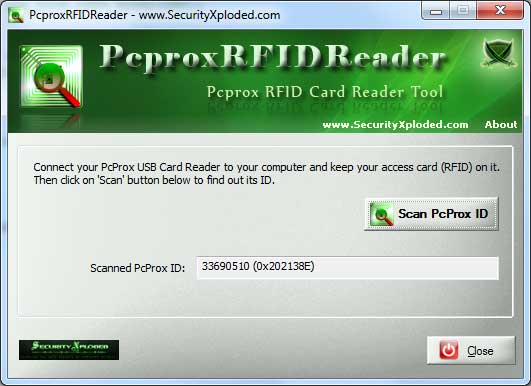
PcproxRFIDReader is easy to use with its simple GUI interface.
Here are the brief usage details
First connect the pcProx USB reader to your
desktop/laptop.
Then keep your access card (HID card) on the
pcProx reader. As soon as you place the card on the reader,
LED will glow green. There may be other readers which may
not have LED.
Next launch the PcproxRFIDReader from its
installed location and click on "Scan pcProx ID"
button.
Within few moments your card ID will be displayed in the text
box in both decimal and hex format.
Now you can copy this card number and use it wherever you want.
Screenshots
Screenshot 1: PcproxRFIDReader showing the
scanned HID card ID.
Release History
Version 3.0 : 23th July 2016
Mega 2016 release to support for new Windows 10 version.
Version 2.0 : 15th Jun 2014
Improved GUI interface with glowing icon effects.
Version 1.5 : 18th Jan 2013
Support for Windows 8, Fix for Refresh screen problem and UI improvements.