| |
| |
| |
 |
|
|
|
| |
| |
| |
| |
|
|
| |
| |
| |
|
|
|
| |
| |
|
|
SpyBHORemover (formerly BHORemover) is the advanced tool to
explore and remove Malicious BHO's from your
system.
BHO stands for 'Browser Helper
Objects' which are plugins written for 'Internet Explorer' to
enhance its capabilities. Often this feature is being misused by
many spyware programs to monitor user's browsing habits and to steal
the users credentials silently. Also some of the BHO's
slow down the system considerably. |
|
|
SpyBHORemover helps in quick
identification and removal of such spy BHO's present in the
system. It not only performs heuristic based threat analysis but
also provides Online
Threat Verification mechanism which makes it easy to differentiate
between legitimate and malicious BHOs.
It also presents
'Backup & Restore' feature which makes it
easy to remove and re-install the BHO any number of times. Users no
longer have to worry about accidental removal of BHO as all removed
BHOs are automatically backed up which can then be restored from
'Removed BHO List'. It also comes with a unique feature to
completely enable/disable all installed BHOs at one shot.
It works on wide range of platforms starting from Windows XP to latest operating system, Windows 8. |
| |
| |
| |
|
| Here are the highlights of some of the salient features of
SpyBHORemover which makes it special. |
- Automatically scan & analyze all installed and previously removed
BHOs instantly.
- 'Advanced Threat Analysis' for each installed BHO using the built-in
heuristic mechanism.
- Color based threat representation for quick identification and
separation of BHOs based on various threat levels.
- New 'Backup & Restore' feature enables user to remove and re-install
BHO as many times without any worries.
- Shows all running processes having the selected BHO DLL
and provides option to Kill the process or Remove the DLL from such
process.
- Unique feature to completely enable/disable ALL installed BHOs
for the current user at one shot.
- 'Online Threat Verification' of malicious BHO using any of the
following popular online portals.
-
VirusTotal (www.VirusTotal.com)
- ThreatExpert (www.ThreatExpert.com)
- ProcessLibrary (www.ProcessLibrary.com)
- One click BHO removal option to remove the selected BHO instantly.
- ight click menu option for all the lists for quickly
execution desired action.
- View detailed properties of selected BHO DLL through double click or
right click menu options.
- Quickly jump to corresponding BHO location in Registry using Regedit
tool for selected BHO.
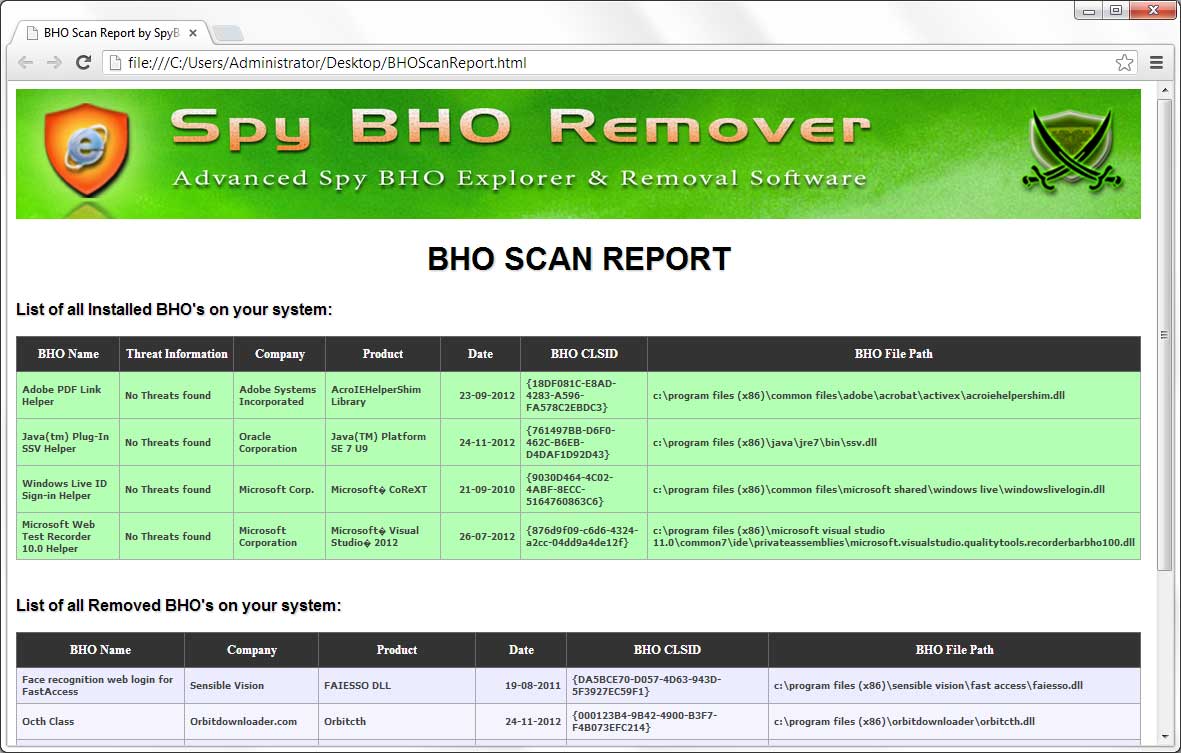
- Export the complete BHO scan report along with threat analysis
information to standard HTML format for offline analysis.
- Displays detailed information for each installed BHO
- BHO Class Name
- Threat Analysis Information
- Company
- Product Name
- Install Date
- CLSID of the BHO
- BHO File Path
- Enriched GUI interface with user friendly options and cool buttons.
- Sort feature to arrange the displayed BHO's based on various
parameters such as BHO name/threat level/company/product
name/date/clsid/dll path.
- Does not require any installation as it is standalone
portable tool
and can be run directly on any system.
|
| |
| |
|
| Though SpyBHORemover is a Portable tool, it comes with
Installer so that you can install it locally on your system for regular usage. This
installer has intuitive wizard (as shown in the screenshot below) which
guides you through series of steps in completion of installation. |
| |
| At any point of time, you can uninstall the product using the
Uninstaller located at following location (by default) |
| |
[Windows 32 bit]
C:\Program Files\SecurityXploded\SpyBHORemover
[Windows 64 bit]
C:\Program Files
(x86)\SecurityXploded\SpyBHORemover |
| |
| |
| |
|
Here is the brief usage information.
|
- Run SpyBHORemover on your system and it will automatically list
all installed BHO's on the system as shown in the screenshot 1 below.
- It shows each of the installed BHO with different colors based on the
threat levels which helps in distinguishing between malicious and
legitimate BHO.
- Once you click on any of the BHO, it will display the
'Process List' at the bottom showing all the running processes
having the selected BHO DLL.
- Then you can choose to Kill
such process or Remove the BHO DLL from that process using right
click menu options.
- For any suspicious BHO you can right click on its entry which
will display popup menu with more options. Then you can choose 'Check online' option to perform online
threat verification.
- To remove any of the malicious BHO, just click on 'Remove' button
which will instantly disable it and store the entry in the backup list.
- If you have accidently removed the BHO or if you just want to
re-install any previous removed BHO then you can select it from the
'Removed BHO List' and click on 'Restore' button to re-install it.
- Alternatively you can enable/disable all BHO's at one shot using the
'Enable/Disable BHO' button at the bottom.
- Finally you can export the entire scan report with all details to HTML
file using 'Export' button.
|
| Note that you have to run SpyBHORemover as administrator to remove
or restore the BHO. Otherwise you will be only able to view installed
and removed BHO list. Any attempt to remove or restore BHO will fail due
to insufficient privileges. |
| |
| |
| |
|
| Here are the screenshots of SpyBHORemover in
action. |
| |
| Screenshot 1: SpyBHORemover displaying
currently installed as well as removed BHO's from the local system. You
can also see the Right Click Popup Menu showing various options for
quick execution of desired action. |
| |
 |
| |
| |
| Screenshot 2: BHO scan report in HTML format
generated by SpyBHORemover |
| |
 |
| |
| |
| |
|
On running, SpyBHORemover automatically scan
the BHO install location and display them with all the relevant information.
All the installed 'Browser Helper Objects' are present at following
Registry location
|
|
| HKEY_LOCAL_MACHINE\SOFTWARE\Microsoft\Windows\CurrentVersion\Explorer\Browser
Helper Objects |
| |
Each entry under this key is a CLSID which
uniquely identifies particular BHO. Once you know the CLSID, more
information about it can be found by looking for this CLSID under
following registry key
|
|
| HKEY_LOCAL_MACHINE\SOFTWARE\Classes\CLSID |
| |
This entry contains name of BHO along with associated
DLL path location which can be used to find more information such as company
name, product name, version, installation date etc.
In order to completely remove the BHO from the system one has to remove
all these registry entries. However SpyBHORemover does not remove all
these entries but only the main entry from install location to disable
the BHO and stores it in the following backup registry location
|
|
| HKEY_LOCAL_MACHINE\SOFTWARE\SpyBHORemover\BackupBHOList |
| |
Though the BHO is still present on the system,
it will prevent the BHO from loading into Internet Explorer. This way it
will be easy to re-install the removed BHO later on.
In case of
malicious BHO it is advised to completely remove these registry entries
and delete BHO file from the system manually. |
| |
| |
| |
|
| Fully renovated GUI interface. Now supports IE 10 on Windows 8. |
| |
| Major GUI enhancements, Improved HTML report, Fixed the ProcessLibrary Online scan operation etc. |
| |
| Improved BHO scan report, enhanced GUI interface and fixes to
minor bugs. |
| |
| 'Setup Wizard' for local Installation & Uninstallation of the software. It also includes automatic software updater to detect new versions. |
| |
| New feature to list all running processes having the selected
BHO DLL. Option to kill such process or Remove the BHO DLL from that
process. Right click menu added for all the lists with more options.
Improved user interface along with bug fixes such as 'Jump to
Registry'. |
| |
| Fixed the issue with certificate verification during refresh on
non-english platforms. Thanks to Algasys for reporting and helping
to resolve this problem. |
| |
| Name is changed from BHORemover to SpyBHORemover. This advanced
version comes with pathora of features such as enhanced user
interface, Backup & restore feature, Online verification mechanism,
HTML Report generation, Option to globally enable/disable BHO for
current user etc. |
| |
| Now one can view the BHO file properties by either double
clicking on the selected entry or clicking on 'properties' button.
Added sort by date feature to make it easy to view the latest
installed BHO. Also now it displays the tooltips for buttons to make
it more clear. |
| |
| This version comes with new features such as online verification
of BHO through processlibrary.com, sorting of the entries in the
list based on various parameters, enhanced user interface with
really cool look & feel. |
| |
| User interface improvement, Vista UAC compatibility along with
bug fixes. |
| |
| First public release of SpyBHORemover |
| |

|
| |
| |
|
|
|
| |
| |
| |
| |
|
|
| |
| |
| |
| |
| |
| |
| |
| |