|
| Hash Generator
Version: 8.0
|
|
|
|
|
|
|
|
| |
|

|
Hash Generator is the FREE universal hash generator
tool which automates the generation of 14 different type of hashes or
checksums. It support most of the popular hashes including
MD5
family, SHA family, BASE64,
LM, NTLM, CRC32, ROT13, RIPEMD, ALDER32, HAVAL, WHIRLPOOL etc. |
|
|
It can even
generate hash for the file as well as text input also.
User can directly enter or paste any text from clipboard and generate hash.
It also supports 'Drag & Drop interface' which
allows you to quickly
drag files onto the tool for hash generation.
Hashes or checksums are mainly used for file integrity verification. Often files
downloaded from Internet are checked with MD5/SHA256 hash to make
sure file is not tempered. Hashes are also used in encryption and
storage of password as well as other sensitive data to protect it
from the spying eyes. HashGenerator helps in quickly computing or
verifying the hash for any such file or password text.
Also check out Hash Console - Command-line version of Hash Generator.
Hash Generator works on both 32-bit & 64-bit platforms starting from Windows Vista to Windows 11. |
|
| |
|
- Generate hashes for 15+ popular algorithms including MD5, SHA1, SHA256,
BASE64, LM, NTLM etc.
- Create Hash for either the File or custom Text.
- 'Drag & Drop' feature to quickly drag files onto the tool.
-
Shell Context Menu to quickly generate hash by simply right
clicking on any file.
- Option
to to selectively copy the hash from the displayed list.
- Save
the generated hash list to HTML/TEXT/XML/CSV file
- Simple, Easy
to Use GUI Interface.
- Completely Portable Tool
which also comes with Installer for local Installation & Uninstallation.
|
| |
|
| It comes with simple Instaler that helps you to install it locally
on your system for regular usage. It has intuitive setup wizard which guides you through series of steps
in completion of installation. |
|
| At any point of time, you can uninstall the product using the
Uninstaller located at following location (by default) |
|
[Windows 32 bit]
C:\Program Files\SecurityXploded\HashGenerator
[Windows 64 bit]
C:\Program Files
(x86)\SecurityXploded\HashGenerator |
| |
| |
|
HashGenerator is GUI application which comes with simple interface and
makes it easy to use even for beginners.
Here are simple steps |
- Launch HashGenerator application on your system.
- Select the
file by clicking on Browse button or Simply Drag and Drop a
file or Directly type the full file path in the edit box
- Next Cilck on
'Generate Hash' button. You will see all hashes being generated one
by one and displayed in the list.
- Now it automatically copy the MD5 hash to clipboard. Also you can right click on the
List to selectively copy any hash.
- Finally you can export entire
hash list to HTML/XML/Text/CSV file by clicking on 'Export' button and then select the type
of file from the drop down box of 'Save File Dialog'..
|
Here instead of selecting file you can also directly enter or paste any
text (up to 250 characters) and generate the hash for it.
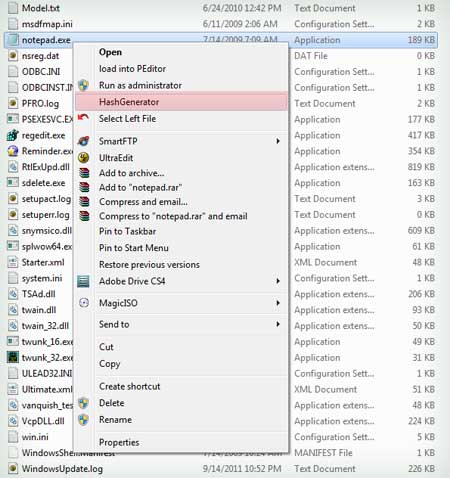
Now with version v1.5 onwards you can simply right click on any file and
launch HashGenerator from "shell context menu".
For this to be active, you need to run HashGenerator at least once on
your system that will install the context menu option. |
|
|
|
|
|
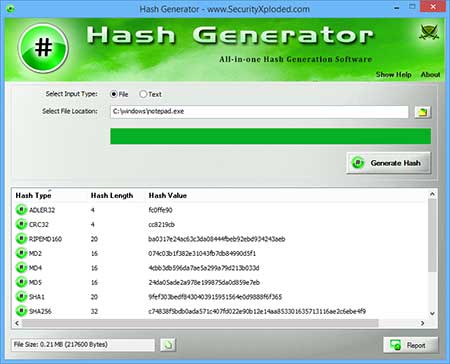
| Screenshot 1:HashGenerator is showing all the
popular hashes generated for the input file. |
|
 |
|
| Screenshot 2: "Shell Context Menu" option
to launch HashGenerator directly by right clicking on any file. |
|
 |
|
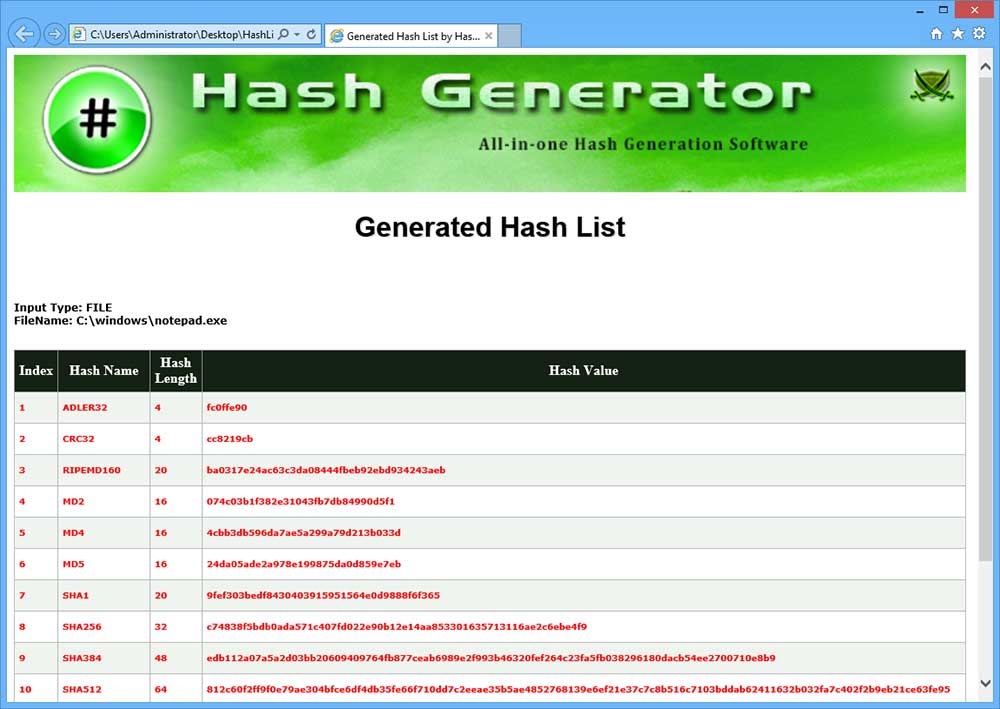
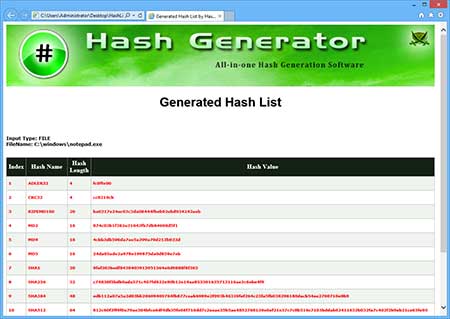
| Screenshot 3: Hash list exported to HTML file by HashGenerator |
|
 |
| |
| |
|
| New 2023 version supporting latest Windows 11 version. |
| |
| Major 2019 release with support for CSV file report. Also removed false positive issues with antivirus. |
| |
| Major 2018 release with improved hash generator speed |
| |
| Major update with new Installer supporting seamless installation & un-installation. This also fixes bug in previous installer. |
| |
| Mega 2016 release with support for new Windows 10. Also improved Installer/Un-installer and fixed right-click context menu. |
| |
| Mega version with renovated GUI edition featuring Copy file size option, Upto 1000 char text hash generation, glowing icon effects etc. Also integrated Uninstaller into Windows Add/Remove Programs. |
| |
| Automatically copy MD5 hash to clipboard. Displays File Size. Fixed broken link in report. |
| |
| Now it can generate LM & NTLM hash for input text. Improved user interface with cool banner. |
| |
| Support for report generation in XML format along with HTML/Text format. Displays hash length. Few minor bug fixes. |
| |
| Added right click context menu option. Now you can simply right click on any file and generate hash for it. |
| |
| First public release of HashGenerator |
| |
|
| |
|
| This tool would not have been possible without open contribution
from bright minds, We would like to extend our gratitude towards
following
individuals/groups for their contribution |
- OpenSSL Group
- Paulo S. L. M. Barreto & Vincent Rijmen for Whirlpool algorithm
|
| |
| |
|
|
| |
| |
| |
|
|
|
|