|
| Mail Password Sniffer
Version: 4.0
|
|
|
|
|
|
|
|
|
|
|
| |
|

|
Mail Password Sniffer is the free Email Password Sniffing and Recovery Software to recover mail account passwords passing through the network.
|
|
|
|
It automatically detects the Email authentication packets passing through network and decodes the passwords for all Mail Protocols including POP3, IMAP, SMTP.
It can recover mail account passwords from all the Email applications such as Outlook, Thunderbird, Foxmail etc. For each recovered Email Account, it displays Email Protocol, Server IP Address, Port, Username & Password.
This tool will give best results in following scenarios,
- Run it on Gateway System where all of your network's traffic pass through.
- In MITM Attack, run it on middle system to capture Email Passwords from target system.
- On Multi-user System, run it under Administrator account to silently capture Email passwords for all the users.
This software requires WinPcap driver for capturing network packets. You can install the same from here.
Mail Password Sniffer works on both 32-bit & 64-bit platforms starting from Windows XP to Windows 10. |
| |
- Free Tool to Sniff & Recover Email Passwords from all Email Applications
- Recover passwords for all Email protocols such as POP3, IMAP, SMTP.
- Recover password of any length and complexity.
- Backup the recovered Email password list to HTML/XML/Text/CSV file
- Easier and faster to use with its enhanced user friendly GUI interface.
- Support for local Installation and uninstallation of the software.
|
| |
|
| Mail Password Sniffer requires WinPcap to capture the network packets. Below is the download location for different operating system
Make sure you install WinPcap driver before running this application. |
| |
| |
|
MailPasswordSniffer comes with
Installer which install all the required softwares along with main
software so you do not have to worry about separately installing any of
the dependent softwares.
It has intuitive setup wizard which
guides you through series of steps in completion of installation. |
|
| At any point of time, you can uninstall the product using the
Uninstaller located at following location (by default) |
|
[Windows 32 bit]
C:\Program Files\SecurityXploded\MailPasswordSniffer
[Windows 64 bit]
C:\Program Files
(x86)\SecurityXploded\MailPasswordSniffer |
| |
| |
|
|
Here is the detailed information on how to effectively use
Mail Password Sniffer to capture the mail passwords flowing through the
wire. |
- Launch the 'Mail Password Sniffer' from its installed location.
- Select the right 'network interface' for
sniffing the network packets. If you don't know then you can experiment
with each of them and see which one works !
- Then click on 'Start Sniffing' button
and it will start sniffing operation
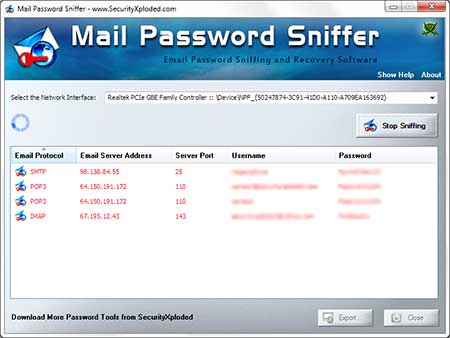
- You will see Email account passwords being displayed as they are captured from network traffic
as shown in the screenshot
below.
- You can now stop the recovery operation and save the
recovered password list to HTML/XML/Text/CSV file by clicking on 'Export' button and then select the type
of file from the drop down box of 'Save File Dialog'.
|
| This software requires WinPcap driver for capturing network packets. You can install the same from here. |
| |
| |
|
| Screenshot 1:MailPasswordSniffer is showing the
recovered Mail account passwords. |
|
 |
|
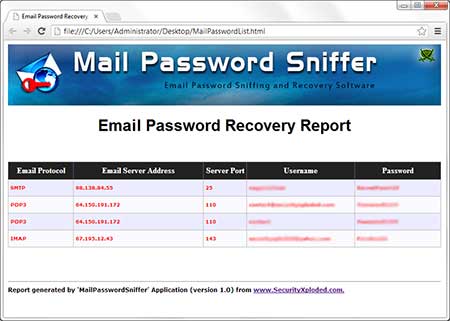
| Screenshot 2: Email Password Recovery Report in HTML format |
|
 |
| |
| |
|
Mail Password Sniffer depends upon WinPcap for capturing network packets. So
if you have not installed it earlier then you will see the error message like below
"This application has failed to start because
wpcap.dll was not found. Re-installing the application may fix the
problem"
In such case you can just install WinPcap driver from here. |
| |
|
| Mega 2017 edition to support email password sniffing on Windows 10. Also added new installer. |
| |
| New feature added to Installer to dynamically download latest version. |
| |
| Integrated latest version of windows packet sniffer engine. Also integrated Uninstaller into Windows Add/Remove Programs. |
| |
| New feature to save the recovered passwords in in CSV (Comma-Seperated Values) File Format. |
| |
| Support for Windows 8. Added right click context menu to quickly copy the mail password from the List. |
| |
| First public release of MailPasswordSniffer |
| |
| |
|
|
| MailPasswordSniffer is designed to recover the lost Mail account
passwords and to help penetration testers. Like any tool its use either good or
bad, depends upon the user who uses it. However Author or
SecurityXploded is not
responsible for any damage caused due to misuse of this tool.
Read complete License & Disclaimer terms
here. |
| |
|
|
|
| |
| |
|
|
|
| |