| |
| |
 |
|
| |
| |
| |
| |
|
|
| |
| |
| |
|
|
|
| |
| |
|
|
Opera Password Decryptor is the FREE tool to
instantly recover the passwords stored by all versions of Opera.
|
|
|
Like other web browsers such as IE, Firefox etc Opera also
stores the username/passwords for websites visited by user.
However passwords are stored only if the user opts to save password
during authentication. This is very useful feature as it prevents
user from hassle of entering password everytime.
Opera stores the passwords along with username, website and other related
information in the password file (wand.dat) in an encrypted format. 'Opera Password Decryptor'
automatically detect the secret password file location and decrypts
all the passwords instantly.
It works on wide range of platforms starting
from Windows XP to latest operating system Windows 8.
|
| |
| |
| |
|
- Instantly decrypt and recover stored encrypted passwords
from 'Opera Secret Store' for all recent versions of Opera.
- Provides support for recovering stored opera passwords from
different system also.User can specify remote system's wand.dat
file path to recover the passwords.
- Automatically discovers 'Opera Password File'
(Wand.dat) based on installed version of Opera.
- By default passwords are not displayed in clear text as it
is sensitive information. However user can view the same using 'Show
Password' option.
- On successful recovery operation, username, password
along with a corresponding login website is displayed.
- Provides option to sort the displayed password list by
username, password or website which makes it easy to search through
100's of stored account entries.
- Backup the Recovered Opera password list to
HTML/XML/Text file .
- Integrated
Installer for assisting you in local Installation & Uninstallation.
|
| |
| |
|
Opera stores the password in
encrypted format in the file called 'Wand.dat' at its profile location.
The Opera profile location is different for different versions. Here are
the password file (wand.dat) location for recent versions of Opera.
|
[Windows NT/2K/2k3/XP]
C:\Documents and Settings\<username>\Application
Data\Opera\Opera\wand.dat
[Windows Vista/Windows 7]
C:\users\<username>\AppData\Roaming\Opera\Opera\wand.dat |
| |
[Windows NT/2K/2k3/XP]
C:\Documents and Settings\<username>\Application
Data\Opera\Opera\profile\wand.dat
[Windows Vista/Windows 7]
C:\users\<username>\AppData\Roaming\Opera\Opera\profile\wand.dat |
| |
| Opera stores following information in the password Wand file for each of the stored
entry in the following order, |
- Login URL of website
- Main URL of website
- Username field ID
- Username
- Password field ID
- Password
|
| All these information are stored in the encrypted format in wand.dat
file. Opera uses Triple-DES algorithm along with static salt data to
encrypt these secret information. |
| |
For more details on how to decrypt these stored passwords from
'Opera Secret Store' refer to following research article,
'Exposing
the Secret of Decrypting Opera Passwords' |
| |
| |
| |
|
| It comes with
Installer so that you can install it locally on your system for regular
usage. It has intuitive setup wizard which
guides you through series of steps in completion of installation. At any
point of time you can use Uninstaller to remove the software from the
system. |
| |
| At any point of time, you can uninstall the product using the
Uninstaller located at following location (by default) |
| |
[Windows 32 bit]
C:\Program Files\SecurityXploded\OperaPasswordDecryptor
[Windows 64 bit]
C:\Program Files
(x86)\SecurityXploded\OperaPasswordDecryptor |
| |
| |
| |
|
OperaPasswordDecryptor is the standalone application and it does not
require any installation. You can just run it by double clicking on
the executable file.
Here are the brief usage details.
|
- On launch, OperaPasswordDecryptor tries to automatically discover the
Opera password file (wand.dat). In case of failure or remote system password recovery, you
can manually specify the Wand file location.
- Once password file is specified, click on 'Start Recovery'
button and OperaPasswordDecryptor will instantly decrypt & recover
any passwords stored in the specified wand.dat file.
- Finally you can save all recovered password list to HTML/XML/Text file by clicking on 'Export' button and then select the type
of file from the drop down box of 'Save File Dialog'.
|
|
You can also use OperaPasswordDecryptor to recover passwords from
different system. In that case you can copy opera wand file from the
remote system and then
manually specify that path in 'Opera Wand File' field. |
|
|
|
|
|
|
|
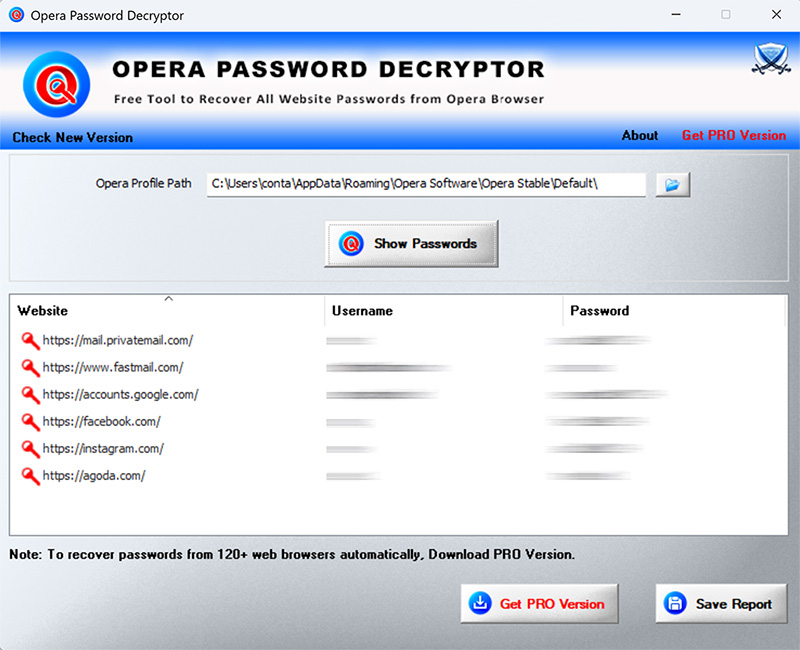
| Screenshot 1: OperaPasswordDecryptor showing the recovered
passwords from Opera password store. |
| |
 |
| |
| |
| |
| Screenshot 2: Opera recovered password list exported in HTML format
by OperaPasswordDecryptor. |
| |
 |
| |
| |
| |
|
| Fixed the file verification during Drag & Drop of file. |
| |
| Support for Drag & Drop of Opera Wand File. Fix for Refresh Screen bug, GUI improvements. |
| |
| Critical fix for virus infection problem
within the installer. |
| |
| Tested successfully with latest Opera version v12.10. Improved GUI interface with cool banner. |
| |
| New enhanced user interface with cool banner. Export to XML feature - now you can export password report to HTML/XML/Text format. |
| |
| Added new logo & links for
passwordforensics.com in about section and few code changes |
| |
| Added 'Setup Wizard' for local Installation
& Uninstallation of the software. Includes automatic software updater to detect new versions. Also presents catchy GUI interface with new banner. |
| |
| First public release of
OperaPasswordDecryptor. Supports recovery of passwords from all
versions of Opera across the platforms starting from Windows 2000 to
latest operating system Windows 7. |

| |
|
| |
| |
| |
|
| Special thanks to sna@reteam.org
for original work on decryption of Opera password file. This tool is
based on his great piece of work. |
| |
| |
| |
|
OperaPasswordDecryptor
is the free tool and designed for good
purpose to help users to recover the lost outlook account passwords.
Like any other tool its use either good or bad, depends upon the user
who uses it.
However author is not responsible for any damage caused due
to misuse of this tool. |
| |
| |
| |
|
|
|
| |
| |
| |
| |
|
|
| |
| |
| |
| |
| |
| |
| |
| |
| |
| |