|
| Vista UAC Maker
Version: 5.0
|
|
|
|
|
|
|
|
|
|
|
| |
|

|
Vista UAC Maker is a free Tool to make your applications UAC compliant for Vista/Windows 7/Windows 8/Windows 10. |
|
|
|
Starting from Vista, all Windows version has new feature
called UAC (User Account Control). In short it basically controls
the way in which applications are executed by different users.
Due
to enforcement of this UAC, by default any application on Vista or higher operating systems will
run under the context of standard user instead of administrator. As
a result the application which requires Administrator privilege will
fail to work properly on Vista/Windows7/Windows 8/Windows 10.
So Vista UAC Maker is designed to address this problem by quickly making any
Windows XP based application compatible with Vista/Windows 7/Windows 8/Windows 10.
It has both GUI and command-line versions making it easier and quicker.
It also includes Installer for local installation & un-installation and works on all platforms starting from Windows XP to Windows 10
|
| |
|
|
To make any application Vista/Windows7/Windows8 UAC
compliant one has to embed a manifest file specifying the privilege
required by the application.
Manifest file mainly contains 2
important information, privilege required by the application and UI
interaction of application with other windows.
|
| There are 3 types of privileges that can be mentioned in the
manifest file.
|
- requireAdministrator: Run as administrator
- asInvoker: Run as same privilege as parent process
- highestAvailable: Run with highest privilege available for user
|
|
Other than this, one has to specify
if the application interacts with user interface of other high
privilege applications. For example your application may send the
message to modify the UI of other high privilege application.
This
is specified through following parameter
|
| uiAccess : TRUE/FALSE |
| |
| |
|
Manifest file is generally put into
the resource section of the application. Typical manifest file with
administrator privilege and with no "uiAccess" appears like this. |
| |
<assembly
xmlns="urn:schemas-microsoft-com:asm.v1" manifestVersion="1.0">
<assemblyIdentity type="win32" processorArchitecture="*"
version="1.0.0.0"
name="MyApplication.exe"></assemblyIdentity>
<description>Vista Application</description>
<dependency>
<dependentAssembly>
<assemblyIdentity type="win32"
name="Microsoft.Windows.Common-Controls"
version="6.0.0.0" language="*" processorArchitecture="*"
publicKeyToken="6595b64144ccf1df"></assemblyIdentity>
</dependentAssembly>
</dependency>
<trustInfo xmlns="urn:schemas-microsoft-com:asm.v2">
<security>
<requestedPrivileges>
<requestedExecutionLevel level="requireAdministrator"
uiAccess="FALSE"></requestedExecutionLevel>
</requestedPrivileges>
</security>
</trustInfo>
</assembly>
|
|
| |
| |
|
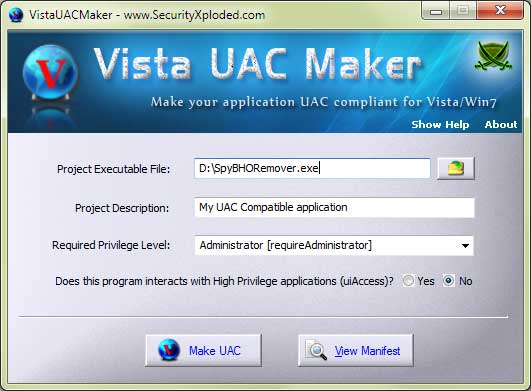
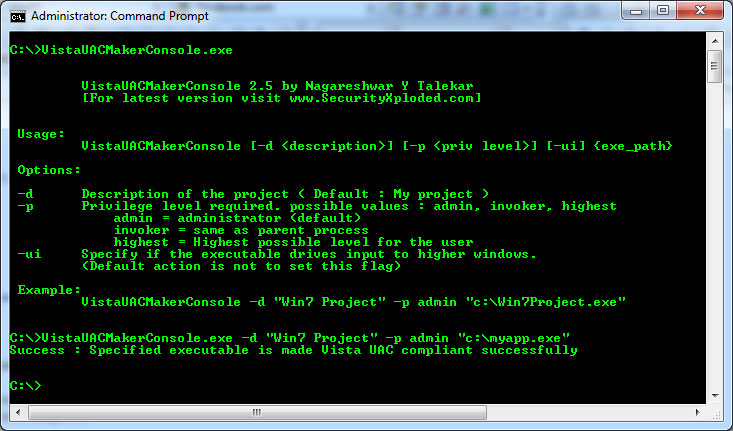
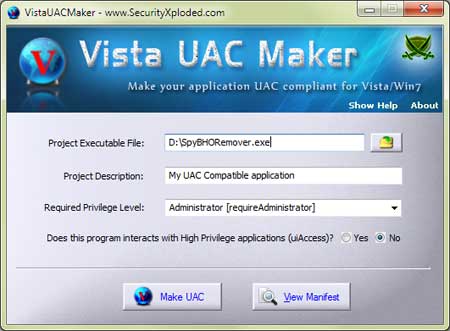
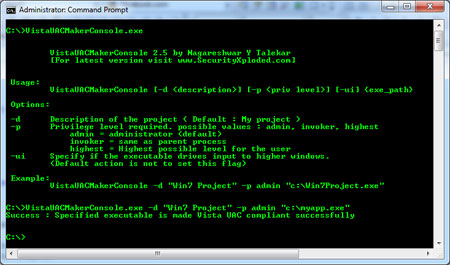
| VistaUACMaker has both console and GUI version. Here are the screenshots of both
GUI & command-line version |
|
 |
|
 |
| |
| |
|
| Though VistaUACMaker is a Portable tool, it comes with
Installer so that you can install it locally on your system for regular usage. This
installer has intuitive wizard which
guides you through series of steps in completion of installation. |
|
| At any point of time, you can uninstall the product using the
Uninstaller located at following location (by default) |
|
[Windows 32 bit]
C:\Program Files\SecurityXploded\VistaUACMaker
[Windows 64 bit]
C:\Program Files
(x86)\SecurityXploded\VistaUACMaker |
| |
| |
|
In just few steps, your application will be ready to run on Vista/Windows 7/8/10
-
Select the application using browse button or Drag & Drop your EXE file.
- Set one of the Privilege required for your application from
selection box.
- Check the "Yes" button if your application interacts with high
privilege applications.
- Now click on "Make UAC" to make it UAC compliant with Vista/Windows7/Win8
- You can also View the existing Manifest (UAC properties) by simply clicking on 'View Manifest' button after selecting the File.
|
| |
|
Console tool makes it easy to
automate the process. For example you can use it as post build step
to make the application Vista/Windows 7/8/10 UAC compliant. Here is the
typical usage information. |
|
VistaUACMakerConsole.exe [-d ] [-p ] [-ui] {exe_path}

Options:

-d      Description of the project ( Default : My project )
-p      Privilege level required. possible values : admin, invoker, highest
            admin = administrator (default)
            invoker = same as parent process
            highest = Highest possible level for the user
-ui     Specify if it interacts with higher privilege windows.
        (Default action is not to set this flag)

Note: To view Manifest section just specify EXE path without any parameters.


Examples:
        //Make Win10Project.exe UAC Compliant with Privilege Level as Administrator
        VistaUACMakerConsole -d "My Win10 Project" -p admin "c:\Win10Project.exe"


        //View the Manifest (UAC Properties) in existing Executable File
        VistaUACMakerConsole "c:\Win10Project.exe"
|
|
|
| |
| |
|
| Major 2017 release with support for making your application UAC compliant for Windows 10. Also includes new Installer. |
| |
| Mega version with the support for making UAC compliant app on Windows 8. Improved GUI screen with glowing icon effects and other changes. |
| |
| Added 'View Manifest' option to view the manifest section (UAC properties) of exising EXE files. Support for quick Drag & Drop of Executable File. Enhanced user interface. |
| |
| Integrated Installer for local Installation & Uninstallation. New
Banner and other minor UI improvements. |
| |
| Support for Windows 7. New attractive GUI with cool look &
feel. |
| |
| Enhanced user interface with improved about dialog. |
| |
| First public release of VistaUACMaker |
| |
|
| |
|
|
|
| |
| |
|
|
|
| |
| |
| |
| |
| |
| |
| |