SecurityXploded.com
Follow us on Twitter
ThunderbirdPassDecryptor : Thunderbird Password Recovery Tool - www.SecurityXploded.com
 
 
ThunderbirdPassDecryptor
Download ThunderbirdPassDecryptor
 
 
5 star award by GearDownload Windows 7 Download Clean award by Softpedia
 
See Also
 
 
Contents
 
About ThunderbirdPassDecryptor
ThunderbirdPassDecryptor is the FREE tool to instantly recover the stored mail account password by Thunderbird. Thunderbird is a free, open-source, cross-platform application for managing email and news feeds. Like other email clients, it also stores the mail account passwords on the local system for subsequent logins so that user don't have to type the password everytime. Thunderbird uses it's own private mechanism with powerful encryption algorithm to store the account details securely in its account database file.
ThunderbirdPassDecryptor helps in instantly recovering such stored mail account passwords and get the complete account access details. You can also use it to recover the Thunderbird account passwords from other system which is not alive or running on completely different platform.

ThunderbirdPassDecryptor is a standalone portable application which does not require any installation and can be run from anywhere. It works on wide platforms starting from Windows XP to latest operating system, Windows 7.
 
 
Features of ThunderbirdPassDecryptor
Here are the highlights of top features of ThunderbirdPassDecryptor which makes it stand apart from other similar tools including commercial ones.
  •  Instantly decrypt and recover the stored encrypted mail account passwords from 'Thunderbird Password Store'

  •  Supports recovery of passwords from local system as well as remote system. User can specify Thunderbird profile location from the remote system to recover the passwords.

  •  It can recover passwords from 'Thunderbird Password Store' even when it is protected with master password. In such case user have to enter the correct master password to successfully decrypt the mail account passwords.

  •  Automatically discovers Thunderbird default profile location based on installed version of Thunderbird.

  •  Passwords are not shown by default for security reasons as it is sensitive data. However user can toggle this behavior using 'Show Password' button.

  •  On successful recovery operation, username, password along with a corresponding login website is displayed.

  •  Sort feature to arrange the displayed password list by username, password or mail server which makes it easy to search through hundreds of entries.

  •  User can save the recovered Thunderbird mail account password list to HTML file for transferring to other system or for future use.

  •  Easy and faster to use with its enhanced user friendly interface.

  •  Does not require any installation as it is standalone portable tool and can be run directly on any system.

 
Internals of ThunderbirdPassDecryptor
Thunderbird uses same mechanism as Firefox (as explained in FirePasswordViewer) to store its email account passwords securely. The passwords are stored in the file called 'signons.sqlite' at its profile location.

Default profile location for different platforms is as follows,
 
[Windows XP]
C:\Documents and Settings\<user_name>\Application Data\Thunderbird\Profiles\<random_name>.default

[Windows Vista & Windows 7]
C:\Users\<user_name>\AppData\Roaming\Thunderbird\Profiles\<random_name>.default
 
The password file is stored in SQLite database format as in the case of Firefox. It contains many tables pertaining to various account configuration of Thunderbird, but the account password details are stored in 'moz_logins' table as shown in the screenshot below (using the SQLite Database Browser Tool)
 
Thunderbird Sqlite Database
 
Here are more details about important fields of 'moz_logins' table
  • table - moz_logins
    • id - index of each entry
    • hostname - Mail Server URL
    • encryptedUsername - encrypted username
    • encryptedPassword - encrypted password
    • guid - unique GUID for each entry
    • encType - value 1 indicates encrypted
Now once the encrypted username and password values are extracted from above database file, ThunderbirdPassDecryptor decrypts them instantly using base64 decoding followed by 3DES algorithm. Information required to decrypt these contents are stored in key3.db file including the master password details. If the master password is set, then you must provide the master password for successful decryption. If you have forgotten the master password, then you can use Firemaster tool to recover the master password.
 
 
Using ThunderbirdPassDecryptor
ThunderbirdPassDecryptor is the standalone application and it does not require any installation. You can run it directly after copying on to the system.

Here are the brief usage details.
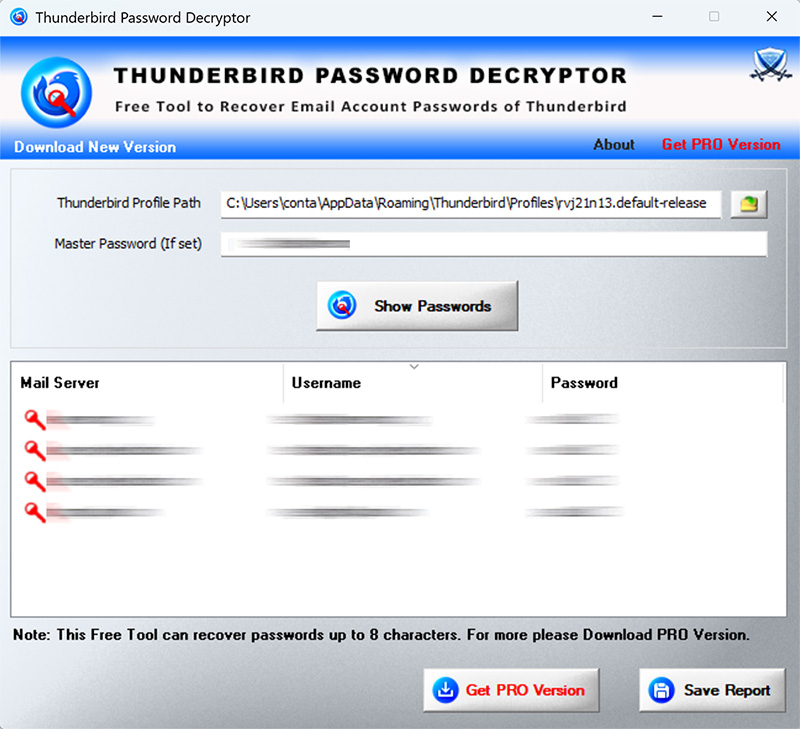
  •  On launch, ThunderbirdPassDecryptor automatically populates the Thunderbird's default profile location.

  •  If you have set the master password for your Thunderbird, then you need to enter the same in the 'master password box'.

  •  Once the profile location is specified, you can click on 'Start Recovery' button and ThunderbirdPassDecryptor will instantly recover all passwords from 'Thunderbird Password Store'.

  •  By default passwords are not shown for security reasons as it is sensitive data. However you can click on 'Show Password' button to view these passwords.

  •  Finally you can save all recovered mail account password list to HTML file by clicking on 'Save as HTML' button.
You can also use ThunderbirdPassDecryptor to recover passwords from different system either Windows or Linux. In that case you can copy Thunderbird profile data from remote system to local machine and then specify that path in the profile location field for recovering such passwords.
 
 
Screenshots of ThunderbirdPassDecryptor
Here are the screenshots which gives glance of ThunderbirdPassDecryptor in action.
 
 Screenshot 1: ThunderbirdPassDecryptor showing the recovered passwords from Thunderbird password store. Note that passwords are hidden by default for security reason.
 
ThunderbirdPassDecryptor
Screenshot 2: Showing the hidden passwords recovered by ThunderbirdPassDecryptor on clicking 'Show Password' button.
 
ThunderbirdPassDecryptor
 Screenshot 3: Recovered Firefox password list stored in HTML format by ThunderbirdPassDecryptor
 
ThunderbirdPassDecryptor showing the saved password list
 
 
Testing ThunderbirdPassDecryptor
ThunderbirdPassDecryptor is successfully tested with  Thunderbird version 3.1.1 and may work with older versions too as long as they use similar password storage mechanism.

If you encounter any problem with ThunderbirdPassDecryptor with any version of Thunderbird, then please contact the author with details about your Thunderbird version and any other information which will help in fixing the problem.
 
 
History
Version 1.0:  27th July 2010
First public release of ThunderbirdPassDecryptor.
 
 
Download ThunderbirdPassDecryptor

ThunderbirdPassDecryptor 1.0

License  : Freeware
Platform : Windows XP, 2003, Vista, Win7

Win 7 Compatible
 
 
See Also


Home - Tools - Articles - Research - Download - Statistics - Blog - PAD Files - About - Contact