| |
| |
| |
 |
| |
| |
| |
| |
|
|
| |
| |
| |
|
|
|
| |
| |
|
|
Hash Compare is the FREE File Hash comparison
tool. It performs Hash based Integrity Comparison using any of
the the popular hash algorthms such as
MD5, SHA1 or SHA256. |
|
|
|
To make the
task easier and quicker, it also supports the 'File Drag & Drop' feature. That means you can just drag & drop one or both files
directly without wasting much time in selecting them.
Hash based method is the standard way of verifying the integrity of
files. Often it is used to check the Integrity of Download Files downloaded
from the internet. It is also used to compare two versions of the
same file. In such cases HashCompare comes handy in performing quick
comparison of the files.
It is fully portable and works on all Windows platforms starting from Windows XP to Windows 8. |
|
| |
| |
| |
|
- Performs File Integrity Comparison using popular
Hash algorithms such as MD5, SHA1 & SHA256.
- 'Drag & Drop' feature to quickly drag one or both files.
- Save the file comparison report to HTML/TEXT/XML file
- Displays detailed
status during the operation.
- Simple, easy
to use GUI Interface.
- Completely Portable Tool, can be run from anywhere.
|
| |
| |
|
| Though HashCompare is a Portable tool, it comes with
Installer so that you can install it locally on your system for regular
usage. It has intuitive setup wizardwhich
guides you through series of steps in completion of installation. |
| |
| At any point of time, you can uninstall the product using the
Uninstaller located at following location (by default) |
| |
[Windows 32 bit]
C:\Program Files\SecurityXploded\HashCompare
[Windows 64 bit]
C:\Program Files
(x86)\SecurityXploded\HashCompare |
| |
| |
| |
| |
| |
|
HashCompare is GUI application which comes with simple interface and
makes it easy to use even for beginners.
Here are simple steps |
- Launch HashCompare application on your system.
- Select 2 files by clicking on Browse button or Simply Drag and Drop a
file or Directly type the full file path in the edit box.
You can also drag & drop 2 files at once.
- Next select one
of the HASH algorithm and cilck on
'Compare Files' button.
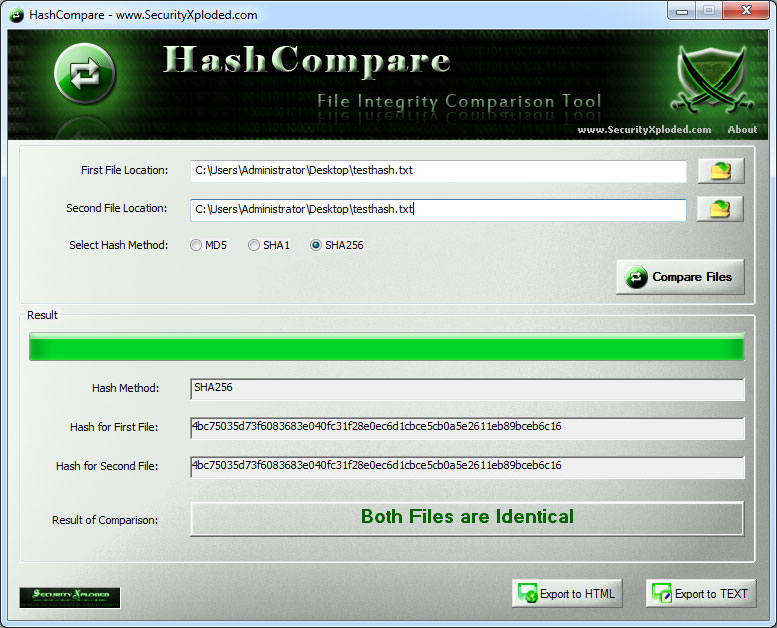
- Now you will see the hashes
for both files being computed one
by one and result of comparison is displayed.
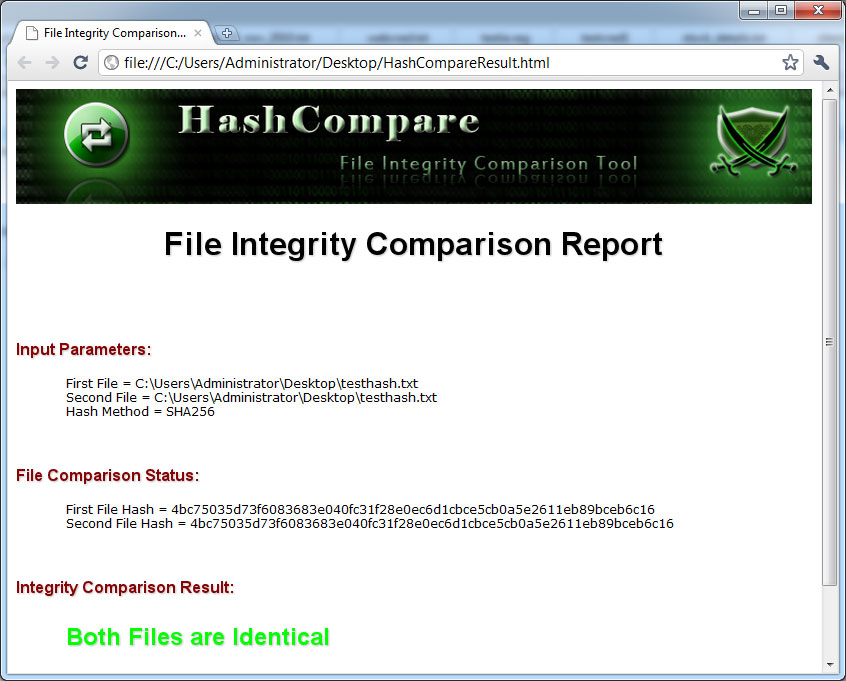
- Finally you can export
the detailed report of comparison to HTML/XML/Text file by clicking on 'Export' button and then select the type
of file from the drop down box of 'Save File Dialog'.
|
|
|
|
|
|
|
|
| Screenshot 1:HashCompare is showing the file
integrity comparison operation |
| |
 |
| |
| |
| Screenshot 2: File comparison result exported to HTML file by HashCompare |
| |
 |
| |
| |
| |
|
| Support for Windows 8. Added quick tool download link. Fixed the bug in Drag & Drop of files. |
| |
| Support for saving result to XML file along with existing HTML/Text file support. UI Improvements with new cool banner & icon. |
| |
| First public release of HashCompare |
| |
| |

|
| |
|
| This tool would not have been possible without open contribution
from bright minds, We would like to extend our gratitude towards
following
individuals/groups for their contribution |
|
|
| |
| |
|
|
|
| |
| |
| |
| |
|
|
|